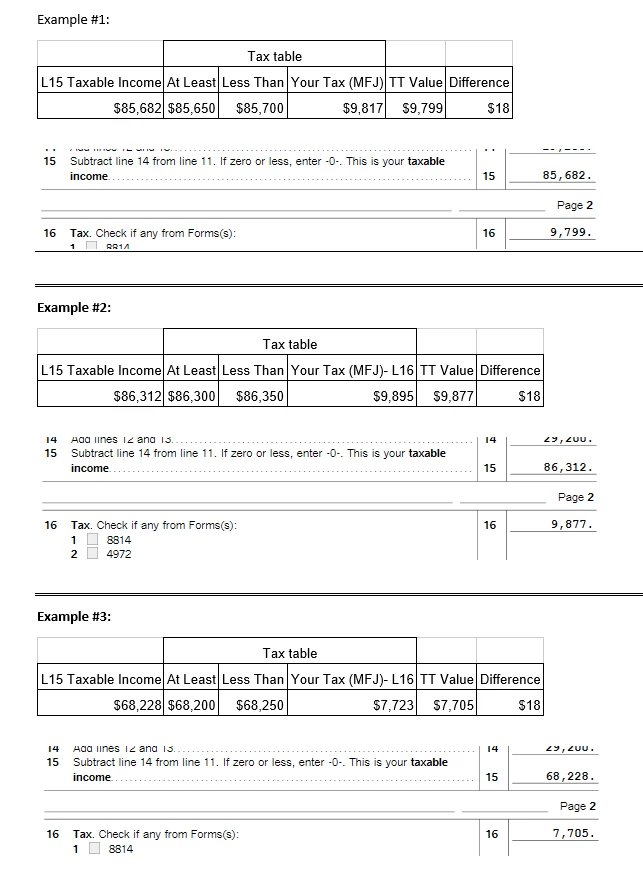
First, I'd say your custom tables you provided above are nice and took some work!
TurboTax doesn't always use just the IRS Tax Tables to calculate the tax shown on Line 16. There are several calculation methods, depending on specific situations in your return. For instance, did you have any capital gains or qualified dividends? If so, then TurboTax would use the Qualified Dividends and Capital Gains Tax Worksheet to make the calculation. That can frequently result in less tax owed.
First, here's how to find out the method(s) that TurboTax used to calculate your tax. Go into Forms Mode. Close to the top of the forms list is the 1040 Worksheet (1040 Wks). Open that worksheet, and scroll way down to between Lines 15 and 16. You should see an interposed Tax Smart Worksheet. What method(s) does it show that TurboTax used?
If you DID have any capital gains or qualified dividends, while in Forms Mode you can also review the Qualified Dividends and Capital Gain Tax Worksheet, which in the forms list is abbreviated as qual div/cap gain (or similar). It would show how the calculation is done on that worksheet, if applicable.
When you provide the additional info, it will be easier for someone to comment.