
February 4, 2025
Solved

Turbo tax is calculating my income higher than what i entered

  • February 4, 2025
  • 1 reply
  • 0 views

Hello, the review on the federal sections is showing more income than i entered and calculating my taxes off of the higher income, so i believe its showing that I owe more in taxes than it should be.


My situation is that when i total all income I've entered into turbo tax I get $65,267. Which is correct for what I've earned. However at the federal review stage there's a breakdown of income and it shows as follows.

Total, $76,577 - Wages, $39,812 - Taxable interest income, $98 - Self-employment income, $14,047 - Unemployment income, $11,310 - Other income, $11,310. 


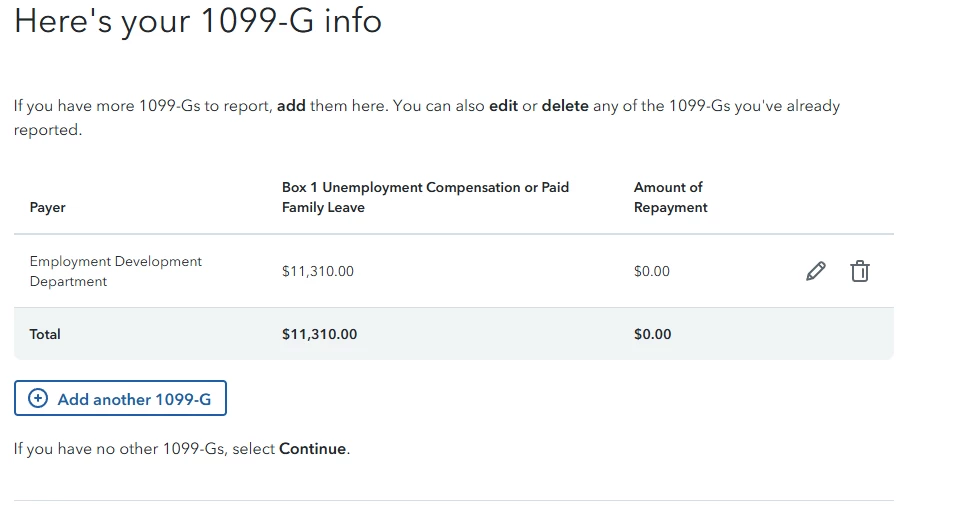
All is correct and matches what I've entered except for the "other income" category. It seems to just be duplicating the unemployment income but i can find where its getting that extra amount from. So in the breakdown its showing that my taxable income is $11,310 more than it should be, I've reviewed all the income I've entered and cant find where this extra bit is coming from.


Any help is greatly appreciated, thank you.
Best answer by RyMarks

@DawnC 


My 1099-g only has box 1-4 on it, of those only box 1 (unemployment compensation) and box 4 (Federal income tax withheld) have any information in them. I shouldn't have any RTAA income and i never entered any into turbo tax.


When i search 1099-g and take the jump to link it takes me that section and there's only the one 1099g for unemployment, and its displaying the correct amount.


If i go to the wages and income section and search 1099G there's an option separate from unemployment labeled "other 1099-G income" and if i select to start that it specifically asks if I've received RTAA payments but even after saying no on that it doesn't remove the extra income from my 1040


I was able to find a solution. All i did was delete the form then re enter it manually and that fixed. I believe the issue was because i was scanning in the 1099G before.

1 reply

February 4, 2025

There are a couple of things you can try. First off, you can look at the worksheets and forms in your program and if you see where the unemployment income appears twice, you can delete the entry that is incorrect as follows:


1. Choose the Tax Tools option on your left menu bar

2. Choose Tools

3. Choose the Delete a form option under Other Helpful links 

4. Review the items in the list and if you see a duplicate unemployment income entry, delete one of them, it may reference Form 1099-G


The second thing you can try is to go to the Wages and Income section and find the Less Common Income entries. Search in that section for an entry referencing your unemployment income. If you find it, delete the entry. Your unemployment compensation should have been listed under the Unemployment section.


**Say "Thanks" by clicking the thumb icon in a post**Mark the post that answers your question by clicking on "Mark as Best Answer"
RyMarksAuthor
February 4, 2025

I tried both of those and didn't see any extra forms or extra sources of income being added. I even tried clearing everything and imputing it again and its still having the same issue.

RyMarksAuthor
February 4, 2025

Here's specifically what im referencing. Adding all the income i entered (not including "refunds received for state/local tax returns." as that's not taxable)  you get a total of $65,267 which is correct.  But on the second image, the federal review page, it shows $76,577 total income cause its adding an additional $11,310 under other income which I never entered in.




