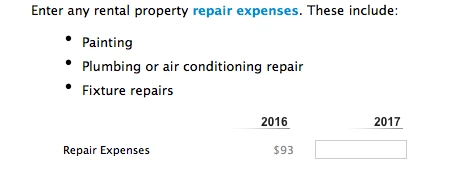
Turbo Tax Premier 2018 asks for 2017 Rental Expenses?
I started my tax preparation with the TurboTax 2018 Deluxe.
As I got to the Rental Properties section, was prompted for an upgrade to the Premier version (the 2018 one). $30 later, I was upgraded and continued my declarations in the newly upgrade software (still the 2018 version).
To my surprise, the software now shows "2016 vs 2017" while prompting me to fill in data for 2017. I was still in 2019, preparing taxes for 2018, yet the software believed I should stick with the past. I'm not taking the risk for a false declaration, what is the best course of action? If I'm better off keeping with the 2018 Deluxe, how do I get a refund for the "Upgrade ... in the past" which I received? I have successfully filed my taxes for 2017, I prefer to move on to 2018.
Here is a screenshot. Please note that the $93 shown under "2016" was, in fact, the amount I declared last year - that is, the 2017 taxes. Hopefully this is just an "oops" moment that the dev/test team had, easily fixed with the next update.