
January 30, 2025
Solved

Turbotax business 2024 Form 1120S schedule L Line 10b column d

  • January 30, 2025
  • 1 reply
  • 0 views

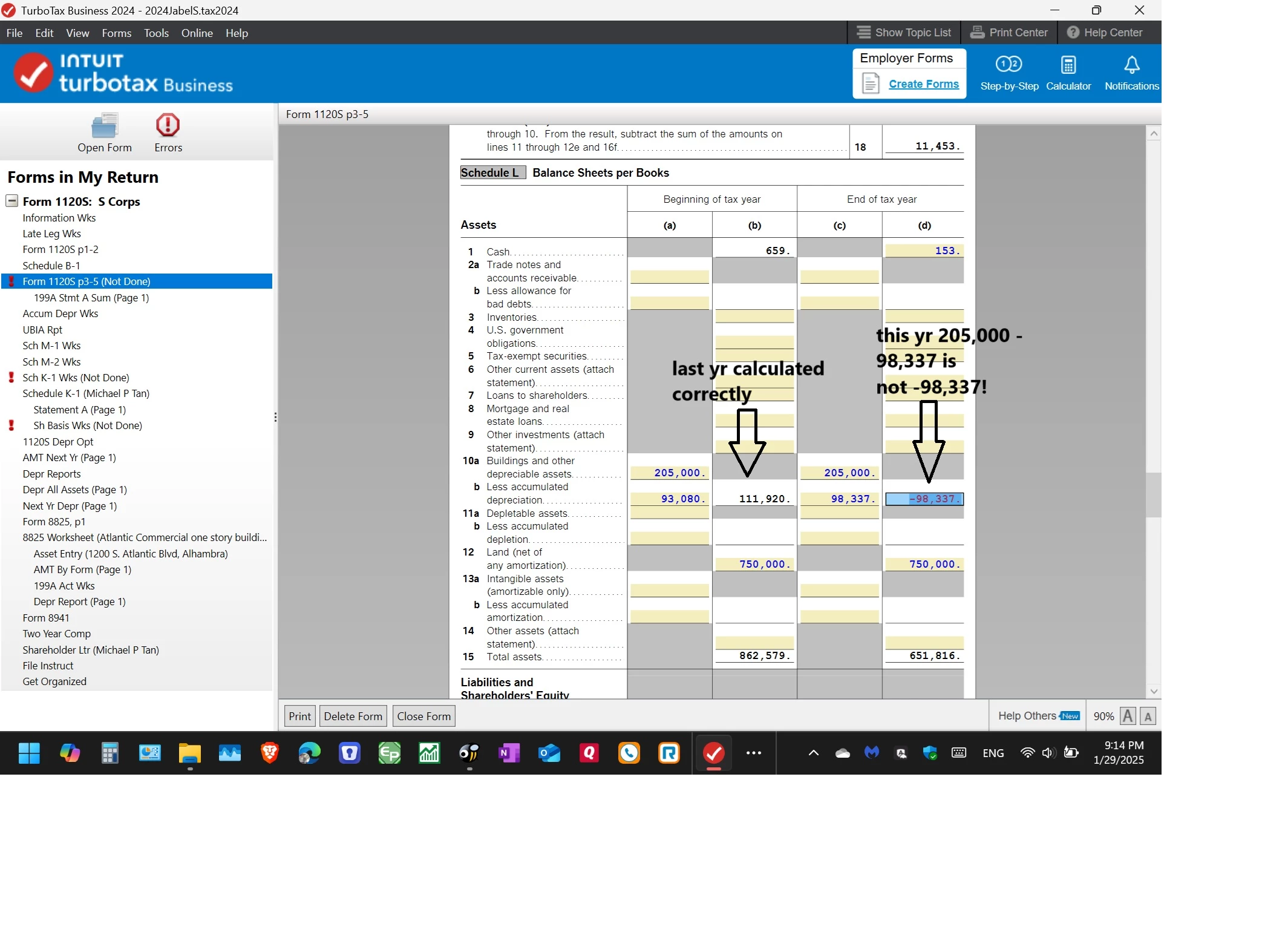
I think there is an error on Turbotax business 2024 Form 1120S schedule L Line 10b column d


my 2023 form calculation for Line 10b column B was correct

205,000 - 93,080 = 111,920


But why is this year column D -98,337 instead of 205,000 - 98,337 = 106,663?


i check my 2022 schedule L, it was calculated the way i think it should. only this year it did not add up. 
thank you

Best answer by KeshaH

Your ending depreciable assets balance may have carried over automatically from the beginning balance and TurboTax may be reading it as a zero. To fix this:


- Click on Step-by-Step in the top right corner.

- Choose Federal Taxes and then Balance Sheet

- Click Edit next to Balance Sheet and then click Quick Entry.

- in the second column, enter 205,000 as the ending balance for your Buildings and other depreciable assets.

- Click Done. Ensure your total assets on this screen are correct. Based on the screenshot you provided, your total ending assets should be $858,816.

1 reply

KeshaHAnswer
January 31, 2025

Your ending depreciable assets balance may have carried over automatically from the beginning balance and TurboTax may be reading it as a zero. To fix this:


- Click on Step-by-Step in the top right corner.

- Choose Federal Taxes and then Balance Sheet

- Click Edit next to Balance Sheet and then click Quick Entry.

- in the second column, enter 205,000 as the ending balance for your Buildings and other depreciable assets.

- Click Done. Ensure your total assets on this screen are correct. Based on the screenshot you provided, your total ending assets should be $858,816.

January 31, 2025

Hi, 


the column do have that same value $205000


but re entering it corrects the problem. 


thank you.




