
February 17, 2025
Question

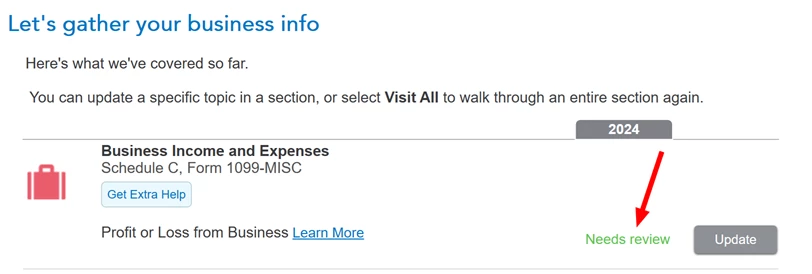
Turbotax defect: Business Income and expenses (Profit and Loss from Business) -- Needs Review

  • February 17, 2025
  • 4 replies
  • 0 views

I use Home and Business windows desktop version.

I am 100% sure that I entered all necessary fields in the Business Income and Expenses section (Profit and Loss from Business), but it still shows 'Needs Review'

Then I started a new tax return and created a sample business. Once I entered the business income, it shows 'Needs Review' immediately.

Something wrong with this 2024 Home and Biz desktop version.

Please fix it!
 

4 replies

February 17, 2025

If you see "needs review" next to any of the categories shown in the Business area of Home and Business, such as Business Profile or Business Income, open the category and check to see if there are any unanswered required questions. 


When you don't see any more "needs review" categories, click Continue. You will then be presented with more questions about the business, such as about Qualified Business Income, and Uncommon Situations. It is important to read the "Learn More" links next to each item.


If you still see a "needs review" on the Schedule C after double-checking all of the categories and questions, there may be something else missing on your return that will come up in the Federal Review. If the return passes review, then it should be complete and ready to file.


See this thread for another discussion about this type of issue.


**Say "Thanks" by clicking the thumb icon in a post**Mark the post that answers your question by clicking on "Mark as Best Answer"
Employee
February 17, 2025

@MonikaK1  I think this has been an known issue. Many people who use 2024 Home and Business windows desktop version are encountering this issue this time.

Could you please escalate it to an appropriate department and let them look into it?

the discussion is here. 

PatriciaV
Employee
March 2, 2025

This experience has been reported to our development team and should be resolved with the update scheduled for Friday March 7, 2025. Because updates are released after business hours Pacific time, we recommend waiting until the day after to run Review again.


Note that TurboTax Online is automatically updated after midnight on form release dates. TurboTax for Desktop is updated when you first open the program.


We appreciate your patience while your concerns were addressed by our programmers.


@pptthouse 

@lindafirpo 

@egrace6311 

@msanie 

@seidma 

@pugpapa75 

@wanderingmyway 

@papa281 

**Say "Thanks" by clicking the thumb icon in a post**Mark the post that answers your question by clicking on "Mark as Best Answer"
February 17, 2025

Yep. Lot of us are having this issue.

I believe it's because Form 3800 still isn't ready via Turbo Tax.

It says DO NOT FILE . They keep delaying it. 

February 24, 2025

Where are you seeing DO NOT FILE? @Jenndy43 

Any update on this issue?

February 26, 2025

seidma


The DO NOT FILE was on Form 3800 but it's since been updated.


However the Needs review is still there. Apparently it's a "known issue" per TT employee responses but it's been weeks now and still not fixed!!

March 1, 2025

This Needs Review is also coming up on Employment Expenses under Job-Related Expenses. Needs Review is also coming up on Business Income and Expenses under Profit or Loss from Business. 
I went over all of my entries a dozen times even started a new return and the Needs Review keeps coming back in those areas.  
I did a Federal Review and it comes back with No Errors. 
I hope Turbo Tax can fix this programming error. 

[email address removed]

March 16, 2025

I am having the same issue. I have answered all the questions, and it stills says needs review. Please fix.

March 17, 2025

I am no longer seeing this issue in Home and Business, if that is where you are seeing it. The issue was referred to developers and we were informed it was fixed.


If you haven't recently, try closing the program and then restarting it. It should tell you to run any needed updates.


You can also follow these steps in TurboTax Desktop:


  1. Select Online from the top menu bar
  2. Select Check for Updates
  3. Run Update

@schesnutwood

**Say "Thanks" by clicking the thumb icon in a post**Mark the post that answers your question by clicking on "Mark as Best Answer"




