
February 19, 2021
Question

Two jobs via the same CPEO and excess social security

  • February 19, 2021
  • 3 replies
  • 0 views

I had two jobs and both employers used the same CPEO.

The CPEO issued a combined W-2 with Social Security tax withheld in Box 4 over the limit.

Since it's considered a single employer, TurboTax (and IRS) won't allow me to claim the excess on Line 10 of Schedule 3.


I'm trying to get the CPEO to split the single W-2 into two separate W-2s for each employer.

However, when I tried to simulate this in TurboTax, I still get an error that I can't claim the excess since both W-2s have the same EIN. TurboTax allows the claim only if I remove the EIN from one W-2.


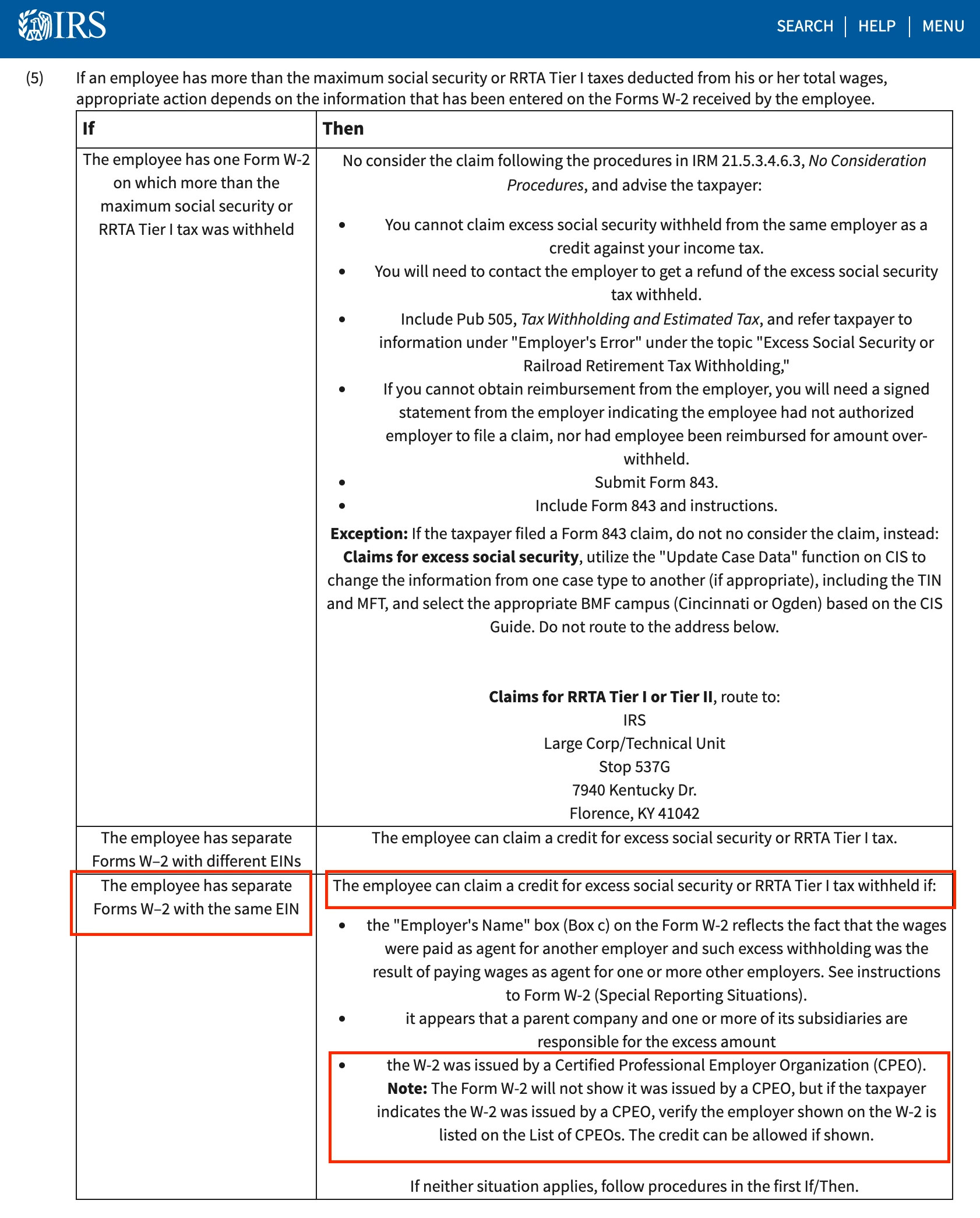
According to IRS Manual, the claim is allowed in case of two W-2s with the same EIN if issued by a CPEO.


Can you confirm that this case is supported by TurboTax?


Source: https://www.irs.gov/irm/part21/irm_21-006-003r#idm140495068671136
3 replies

WendyN2
February 23, 2021

Yes, I can as I just tried a "mock test" run in my TurboTax Desktop for employees, entered a fictitious name, etc., and entered two separate W2's with same EIN for Employer using ABC Co and ABC Co #2 and the only alerts I received were for the overpayment into SS and asking me to verify entries. 

rxsAuthor
February 23, 2021

@WendyN2Thanks for checking this for me, but when I enter the two W-2s with the same EIN, I get a notice that I need to request a refund from the employer. TurboTax won't allow me to claim the excess on Line 10 of Schedule 3, even though IRS allows to claim it on Line 10 if the employer is a CPEO:


MaryM428
February 23, 2021

This is something that TurboTax is not going to be able to support for you.  In this unique situation, you will need to request to have the overpayment reimbursed by the employer.  The software does not read your information as two different employers.  


WendyN2
March 28, 2021

This is a situation not supported by the TurboTax Software, the suggestion is "The taxpayer should manually calculate the excess Social Security tax withheld. Add the amounts on the 'agent reporting' W-2s that appear in Box 4, Social Security tax withheld less the wage base. Enter the excess amount on Schedule 3, near line 10" This will need to be done manually and mailed in.


Please see this TurboTax FAQ, for more information, Are there any personal (individual) tax situations...

February 16, 2023

This situation is not common and therefore as a rule it would take two W-2s with different EINs to automatically receive the credit for excess FICA payments on almost all returns.  Since a certified professional employer organization (CPEO) is being utilized by the two different employers you worked for, then only one W-2 is issued and thus creates a need for manual intervention.  It is because of this situation and the need to file the letter with your return that requires paper filing instead of e-file.

  • This can be accomplished in the TurboTax CD/Download version only as instructed earlier and placed here for convenience.
    • TurboTax CD/Download Switch to Forms (upper right), select "1040/1040SR Wks" and scroll down to Schedule 3 Line 11. Just above that line there is "Excess Social Security Smart Worksheet" where you can override the amount and it should flow to Schedule 3 Line 11. You should also see it reflected in Line 31 of Form 1040.

Maybe the IRS will develop a plan for this in the future since they have dedicated information pages to this situation.

@Gambit135 

**Say "Thanks" by clicking the thumb icon in a post**Mark the post that answers your question by clicking on "Mark as Best Answer"
February 28, 2023

Honestly, I cant believe ADP hasn't came up with a way to explain this to their customers and work with tax agencies on a solution. This is actually very common since ADP is one of the largest payroll platforms in the US. There are multiple employees working for 2 different employers who get W2s with the same FEIN of ADP TotalSource. I am currently working on this for my own employees. ADP TotalSource is absolutely no help. They just give you legal words on why they are right in what they did instead of just being helpful. It's so frustrating that the burden falls on the employees to correct this in unconventional ways. Shame on ADP and shame on TurboTax for not having a solution to this common occurrence.




