March 2, 2025
Solved

Unable to change medical deductions please help!

  • March 2, 2025
  • 1 reply
  • 0 views

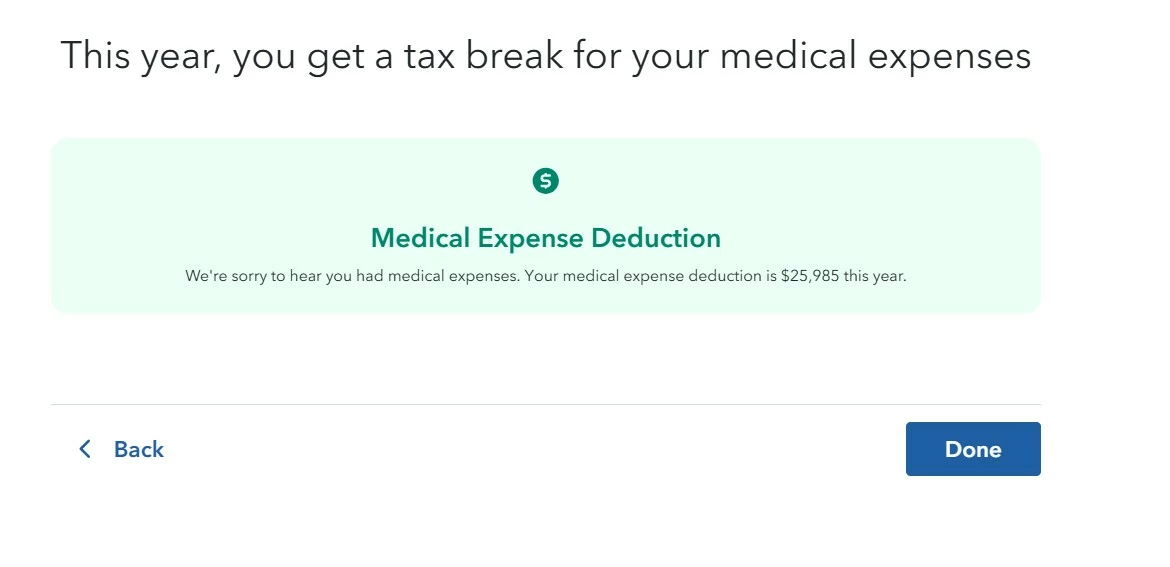
I am trying to make a change to my medical deductions, however when I click the edit button it takes me to the next page, however instead of being able to edit, it just tells me what my tax break is and does not allow any editing. See screenshot


Best answer by JohnB5677

Please confirm the process you are going through.  If it doesn't work you can delete and start again.


Log into TurboTax

  1. Select Deductions & Credits
  2. Scroll to Medical Expenses [Edit]
  3. It should show Tell us about any prescription medication expenses
  4. And you should be able to follow the interview through all of the Medical questions.

If this dose not appear You should delete the Medical section and re-enter it.

On the menu in the sidebar on the left.


Select Tax Tools

  • Tip: You may have to minimize tabs for both Federal & State
  1. On the drop-down select Tools
  2. On the Pop-Up menu select Delete a Form
  3. This will give you all of the forms in your return
  4. Scroll down to the form you want to delete
  5. Select the Form Medical Expense Worksheet
  6. Click on Delete.
  7. Go BACK

Re-Enter your Medical information.

1 reply

JohnB5677
JohnB5677Answer
March 2, 2025

Please confirm the process you are going through.  If it doesn't work you can delete and start again.


Log into TurboTax

  1. Select Deductions & Credits
  2. Scroll to Medical Expenses [Edit]
  3. It should show Tell us about any prescription medication expenses
  4. And you should be able to follow the interview through all of the Medical questions.

If this dose not appear You should delete the Medical section and re-enter it.

On the menu in the sidebar on the left.


Select Tax Tools

  • Tip: You may have to minimize tabs for both Federal & State
  1. On the drop-down select Tools
  2. On the Pop-Up menu select Delete a Form
  3. This will give you all of the forms in your return
  4. Scroll down to the form you want to delete
  5. Select the Form Medical Expense Worksheet
  6. Click on Delete.
  7. Go BACK

Re-Enter your Medical information.

**Say "Thanks" by clicking the thumb icon in a post**Mark the post that answers your question by clicking on "Mark as Best Answer"
March 2, 2025

Deleting the document did the trick. Thank you.