
February 19, 2024
Solved

Unable to pay for state e-file on desktop or over the phone or on desktop program. Customer service cant help
  • February 19, 2024
  • 3 replies
  • 0 views

Bought CD program and completed taxes. When it comes to pay the 20 dollar fee to e-file state taxes, the payment portal didnt work. (tried on two different MacBooks)
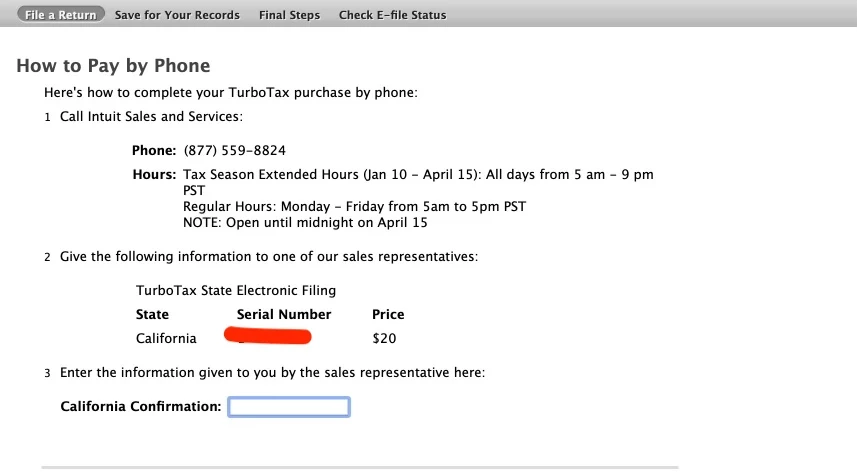
It says to pay over the phone if the payment isn't working. You call the phone number and give them a serial number and theyre supposed to take your credit card info and give you a confirmation code. I did this last year so I know how it's supposed to go.

Spent 5+ hours on customer service over 6 different phone calls. Have been trying to pay this 20 dollar fee for 2 weeks. They cant figure out how/where to enter the serial number and cant give me a confirmation code. I was charged already and cant e-file. 

If the customer service/sales department cant take payment over the phone and provide a confirmation code , there is a systemic problem. Every time I call they try to teach me how to buy turbotax or attempt to take over my browser even though it's a desktop service. Do they not have a sample program they can work through??  None of these work because the desktop software requires me to input a confirmation code. Im completely stuck. 
Have to return CD and find a new method to submit taxes 

    Best answer by AtlantaJoe

    I have the same issue. I’ve been making online payments for years without any issues, but this year, I’ve encountered the same problem. It displays a serial number and asks me to pay over the phone. I called the number, but the service representative did not know what to do. What a nightmare! Intuit needs to fix the software or educate your persons.

    3 replies

    CatinaT1
    February 23, 2024

    Are you still experiencing this problem?


    Make sure you have ran all updates. 


    If using TurboTax Online: Clear your cache and cookies. See this FAQ, for your particular browser.

    If using TurboTax Desktop: Please see this FAQ.

    **Say "Thanks" by clicking the thumb icon in a post**Mark the post that answers your question by clicking on "Mark as Best Answer"
    February 23, 2024

    I am of course still running into this issue 

    I have waited for 3 weeks now and there have been multiple updates and payment portal doesn’t work. 
    I also explained in my original post that I spent hours with customer service and tech service. I’ve spoken with 8 or 9 people. No help. Last person I spoke to tried to explain to me how to purchase TurboTax when I had told her I already prepared my taxes on desktop software. (That is how out of touch their “help” was)  

    the main issue is not that the payment portal doesn’t work. The issue is that there is a link it tells you the click on if you can’t pay online. You click it, the attached instructions pop up. I call the number. I say “I have a serial number for you I have to pay for state efile. “ they don’t know where to enter the serial number. They’re unable to give me a California confirmation code that I need to file my taxes. I was already charged. I haven’t been able to file my taxes.

    last year I had to call this number. They took the serial number, took my credit card information, and gave me a confirmation code. I did this exact thing last year. This year, no one knows how to do it. This is either a training problem or an issue with the system at the side of the sales team 


    This is desktop home and business purchased from Costco. I’m also reaching out to Costco. 

    April 10, 2024

    Same issue! I filed my federal but will need to file the state on paper (uugghhh). Did TT lose thousands of dollars by not being able to accept payments for the product? This is the first issue I have ever had filing with TT and this seems like it should be an easy fix!

    April 15, 2024

    I have the same issue. I’ve been making online payments for years without any issues, but this year, I’ve encountered the same problem. It displays a serial number and asks me to pay over the phone. I called the number, but the service representative did not know what to do. What a nightmare! Intuit needs to fix the software or educate your persons.

    CatinaT1
    April 15, 2024

    If you still experience the issue, please call Customer Service and tell them you have a "block payment issues, possibly due to billing or an invalid license" and the agent should be able to help you. Here is how you reach customer service:  Turbo Tax Customer Service 

    **Say "Thanks" by clicking the thumb icon in a post**Mark the post that answers your question by clicking on "Mark as Best Answer"
    April 1, 2025

    I am having the exact same prob.  I called and paid $25 but the representative told me he couldn't see any efile confirmation number at all.  When I tried to request for refund, the system couldn't even find my order.  It has been 1 week and I still can't just pay $25 to efile my return. 

    April 1, 2025

    Can you clarify what you are seeing when you try to pay for the state return?  Is your system up to date?

    **Say "Thanks" by clicking the thumb icon in a post**Mark the post that answers your question by clicking on "Mark as Best Answer"
    April 1, 2025

    This is an issue on the side of TurboTax. 
    the method of using your federal return to pay for efile only works if you’re getting $45+ return. If you owe, you can’t do it. 

    the issue is that the payment portal on TurboTax’s desktop doesn’t work. It fails. 
    so you can call to order by phone but the customer service isn’t able to input the order (on their end, the place to enter the serial number is greyed out, but we have to provide the serial number for the purchase so they can give a confirmation number in return.)

    I came across a lovely TurboTax employee this time. She listened, she believed what I was saying, she reached out for technical help on their end and someone helped her process the order and provide me a confirmation number. 

    so the issue is two fold:

    - payment for efile doesn’t work on desktop TurboTax 

    - calling in to purchase efile also doesn’t work on their end (the place to enter serial number is greyed out) and they need to get technical support to process the purchase 


    I got the same questions many times. It’s not a setup issue, it’s not a card issue, there is nothing the customer can do.




