
April 25, 2024
Solved

Viewing forms no longer available online?

  • April 25, 2024
  • 1 reply
  • 0 views

I completed entering all my tax information using TurboTax Deluxe ONLINE and I would like to view the forms before I file.

I tried to following this video's instructions, but there is no "Tax Tools" menu item in my ONLINE session:
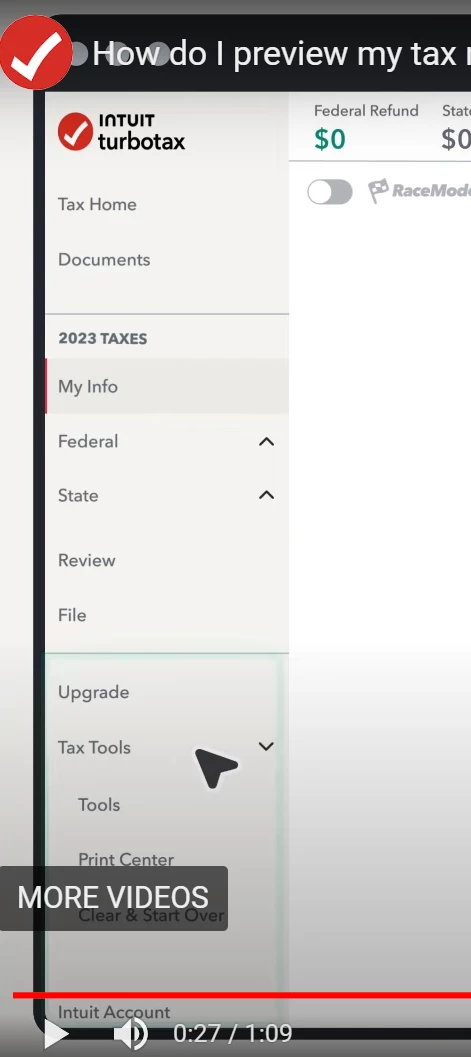


TurboTax Help says "Tax Tools" is only available in the DESKTOP version.


Does this mean viewing form no longer available online?

Best answer by JulieS

No, that's not right. Tax Tools is only available in TurboTax Online. 


If you don't see Tax Tools, make sure you are in the return, not still on the first page. You can select any of the topics in the middle of the first page, then select Pick up where I left off. 


If you still don't see Tax Tools, check to see if the menu scroll bar will scroll down any further. It's very near the bottom of the menu. Here's how to preview your return:


  1. Select Tax Tools from the left-side menu, then Tools.
  2. Select View Tax Summary in the pop up box.
  3. Select Preview my 1040 from the left-side menu.
  4. You will see the Form 1040 with Schedules 1, 2 and 3.
  5. When you are done, select Back from the left-side menu.

1 reply

JulieSAnswer
April 25, 2024

No, that's not right. Tax Tools is only available in TurboTax Online. 


If you don't see Tax Tools, make sure you are in the return, not still on the first page. You can select any of the topics in the middle of the first page, then select Pick up where I left off. 


If you still don't see Tax Tools, check to see if the menu scroll bar will scroll down any further. It's very near the bottom of the menu. Here's how to preview your return:


  1. Select Tax Tools from the left-side menu, then Tools.
  2. Select View Tax Summary in the pop up box.
  3. Select Preview my 1040 from the left-side menu.
  4. You will see the Form 1040 with Schedules 1, 2 and 3.
  5. When you are done, select Back from the left-side menu.

**Say "Thanks" by clicking the thumb icon in a post**Mark the post that answers your question by clicking on "Mark as Best Answer"
Employee
April 25, 2024

If you have used the CD/download for past returns, you may be familiar with using "Forms" mode in desktop software.  Online software does not have Forms mode.   With online, you do not have direct access to all of the forms, schedules and worksheets before you file.  You can preview the Form 1040 and Schedules 1-3, but you cannot see all the schedules, etc. until you have paid your fees and printed out the return or saved it as a pdf.


PREVIEW 1040


https://ttlc.intuit.com/questions/1901539-how-do-i-preview-my-turbotax-online-return-before-filing

Click on Tax Tools on the left side of the screen. Click on Tools. Click on View Tax Summary. Click on Preview my 1040 on the left side of the screen.


https://ttlc.intuit.com/community/printing/help/can-i-print-a-copy-of-my-turbotax-online-return-before-i-file-it/00/26244


**Disclaimer: Every effort has been made to offer the most correct information possible. The poster disclaims any legal responsibility for the accuracy of the information that is contained in this post.**




