
March 8, 2025
Solved

What happened to my passive QBI suspended loss carryover?

  • March 8, 2025
  • 1 reply
  • 0 views

 I was working on 2024 taxes, making entries for my MLP's, and noticed that on one of them, the "QBI suspended losses - passive" did not carryover to 2024. There has never been any positive QBI income from this MLP to offset the losses, so why did it not carry over? The only difference is that 2023 was the first year the capital account went negative, and I had at-risk loss limits. Does that have some kind of effect on passive losses?


Here is a snip from 2023 return:
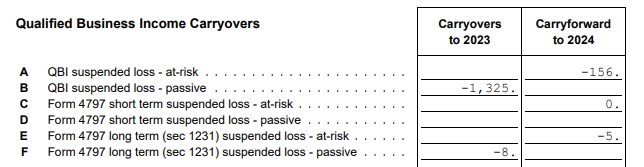
Is there somewhere else in the return that would show why the -1,325 wasn't carried over to 2024?


@nexchap @Mike9241 or anyone else run into this issue?


    Best answer by PatriciaV

    Prior year carryovers should transfer when you start a current year return, regardless of rules that may limit how those losses are applied.


    To correct this, return to the Schedule K-1 for the MLP.

    1. Work through the interview until you see the page "Describe the Partnership." 
    2. Check the box for "I have passive activity losses carried over from last year."
    3. Continue through the next screens where you can enter/edit passive losses for both regular and AMT tax and QBI.
    4. Continue through the interview until you return to the list of partnership/LLCs in your return.

    1 reply

    PatriciaV
    PatriciaVAnswer
    Employee
    March 18, 2025

    Prior year carryovers should transfer when you start a current year return, regardless of rules that may limit how those losses are applied.


    To correct this, return to the Schedule K-1 for the MLP.

    1. Work through the interview until you see the page "Describe the Partnership." 
    2. Check the box for "I have passive activity losses carried over from last year."
    3. Continue through the next screens where you can enter/edit passive losses for both regular and AMT tax and QBI.
    4. Continue through the interview until you return to the list of partnership/LLCs in your return.
    **Say "Thanks" by clicking the thumb icon in a post**Mark the post that answers your question by clicking on "Mark as Best Answer"




