
January 9, 2021
Solved

Where do i enter my 2019 Income tax overpayment on my 2020 return

  • January 9, 2021
  • 2 replies
  • 0 views
No text available
Best answer by VolvoGirl

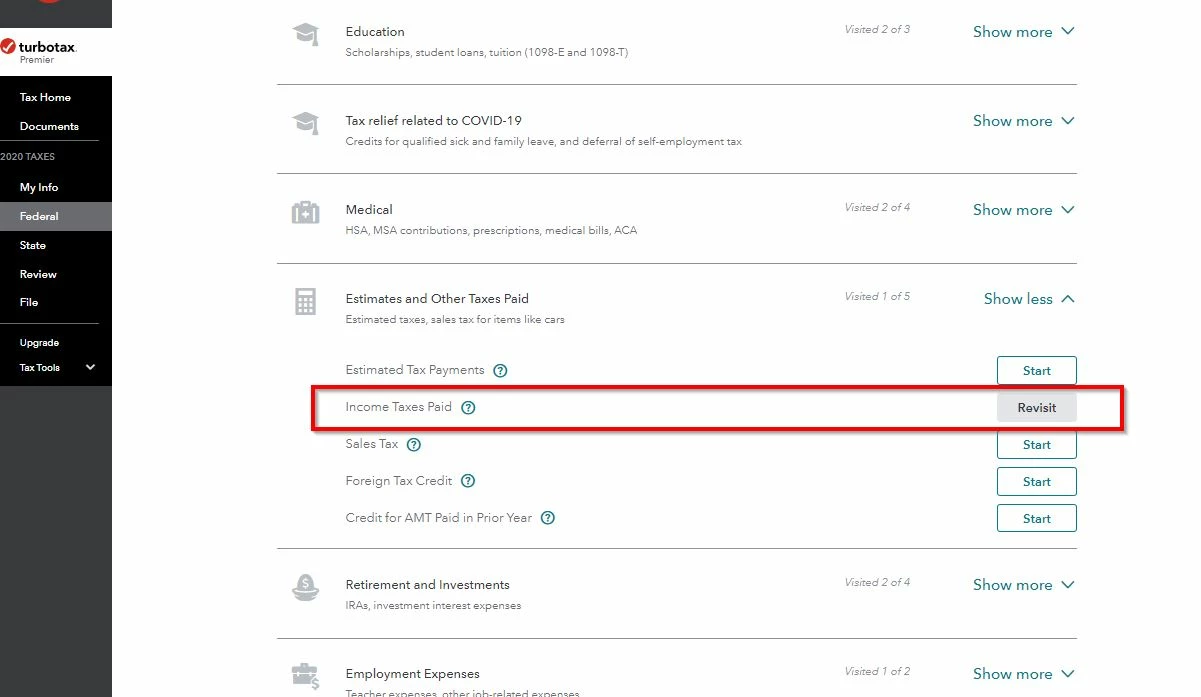
It's on the next item down form Estimates on the Income Taxes Paid line.  Here are 2 screen shots I just made from Online Premier


2 replies

DoninGA
Employee
January 9, 2021

A federal tax refund is not entered on a federal tax return. 

A state tax refund is entered on a federal tax return and may or may not be taxable depending of if you used Standard or Itemized Deductions on the 2019 federal tax return.

allen16Author
January 10, 2021
 
Turbo Tax asks this question:
How much did you pay in federal estimated taxes?
Enter any estimated federal tax payments you made for 2020. Change the dates paid if necessary.
Don't enter payments made in 2020 for your 2019 tax return or any 2019 overpayment applied to this year's return.
 
My tax return when completed should have my 2019 overpayment that I applied to my 2020 estimated taxes.
In the 1040-SR form it is shown in Schedule 3 line 8. 
In the 1040-SR, the total from Schedule 3 line 8 is included on Line 26 2020 estimated tax payments and amount applied from 2019 return  
Turbo Tax does not show my overpayment. Where do I enter it? 
VolvoGirl
VolvoGirlAnswer
Employee
January 10, 2021

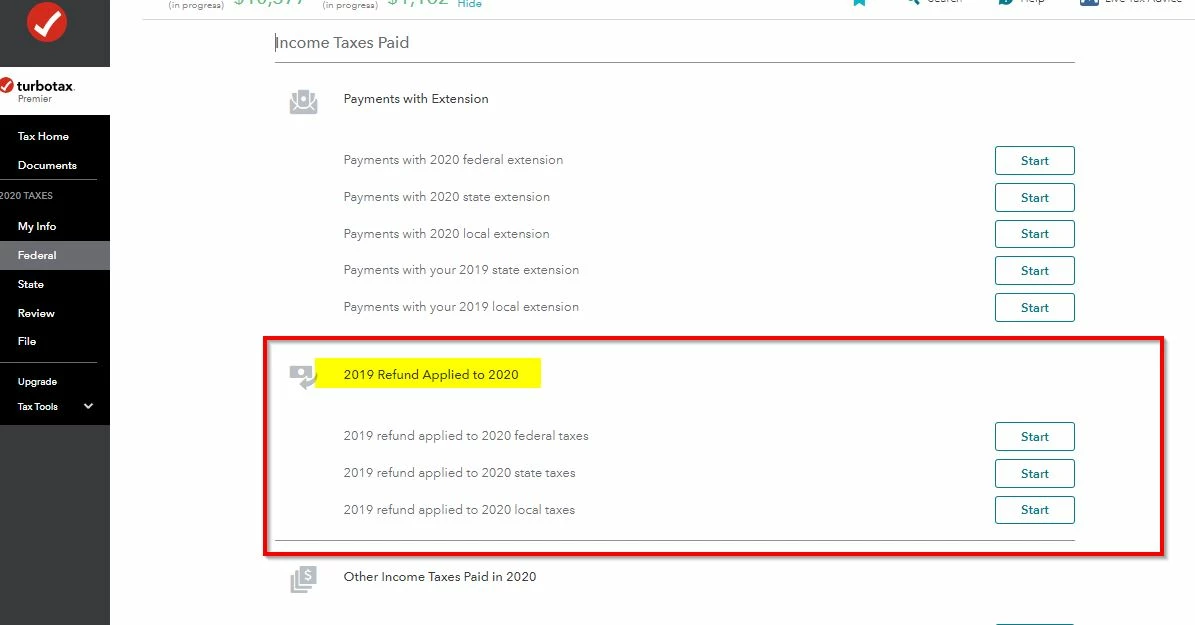
It's on the next item down form Estimates on the Income Taxes Paid line.  Here are 2 screen shots I just made from Online Premier


VolvoGirl
Employee
January 9, 2021

Did you have the IRS keep all or part of your 2019 refund to apply to 2020 as an estimated payment?


If it didn't transfer over from last year then enter a refund from last year that you applied to this year here. BUT first make sure it's not already there. You don't want to apply it twice.
Federal Taxes
Deductions and Credits
Then scroll way down to Estimates and Other Taxes Paid
Income Taxes Paid - Click the Start or Update button

Next page scroll down to 2019 Refund Applied to 2020
Click Start or Update by the tax you applied

allen16Author
January 9, 2021

If it didn't transfer over from last year then enter a refund from last year that you applied to this year here.


Where is "here?


BUT first make sure it's not already there. You don't want to apply it twice.
Federal Taxes

Where are you now? I do not see this anywhere in the 2020 return.
Deductions and Credits

Don't see this
Then scroll way down to Estimates and Other Taxes Paid
Income Taxes Paid

Don't see this as well

- Click the Start or Update button

Next page scroll down to 2019 Refund Applied to 2020
Click Start or Update by the tax you applied




