July 1, 2023
Solved

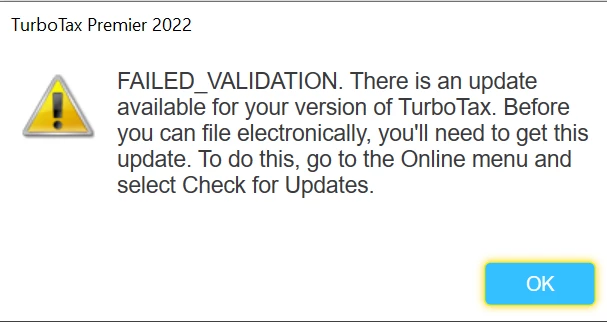
Windows 2022 Premier - Transmit failed validation error

  • July 1, 2023
  • 3 replies
  • 0 views

Hi there. 

I have attempted each of the following to attempt to resolve, without success:

- Uninstall, reinstall

- Uninstall, reinstall, then manually update


Same issue, cannot transmit returns (fed and state together) because updates are needed, but everything is up to date and there is nothing to update.


Anything else I can check?

Thanks!

    Best answer by wpf7

    Update:

    Fed return accepted already.


    Tried transmitting Georgia return again, same error.  Obviously an issue with the state return transmit.


    I will update again once I deal with TT support next week.


    Update:


    Junk product and support.  Spent way too long on phone with TT support having them walk me through all the things I already did.  The end answer was, there is a software 'glitch' (their words) and there is no way to resolve it.  The only options are to install on another PC to see if it changes (I then did that, it did not resolve the same error), or print and mail (which adds 90 days to my state's processing and refund).


    I also have to request a refund of what I paid for the state electronic filing.


    I am very unhappy with the outcome, but they do not care.


    Hope this helps anyone else having this issue, and helps all of us to plan for an alternate tax solution for 2023.

     

    3 replies

    SteamTrain
    Employee
    July 1, 2023

    @wpf7 

    1)  Double check your "Windows" OS updates....and get any waiting OS updates fully installed.


    Windows OS updates were issued this week, and waiting Windows OS updates have blocked proper TTX operation in the past.

    __________

    Of course, who is to say that one of those recent Windows OS updates haven't screwed up TTX operation in some way.

    _____________

    Something else to try if that doesn't work:

    2) :  Close TTX, then rt-click on the TTX icon and select "Runs as Administrator".....and try again.

    ________


    Still no go?  Call TTX support  and let them work on it....software updates to correct "issues" can take a week or two (no longer open on weekends, nor 4th of July, don't know what they are doing with the 3rd of July).

    What is the TurboTax phone number? (intuit.com)

    ____________*Answers are correct to the best of my knowledge when posted, but should not be considered to be legal or official tax advice.*
    wpf7Author
    July 1, 2023

    Thank you so much @SteamTrain for your ideas.


    Unfortunately I tried everything you suggested without success.


    However, I did try selecting ONLY filing the federal return (selected to file Georgia state return later).  The federal return transmit succeeded.  Then I selected just to file the Georgia state return, and it gave the same update validation failure for the state transmit.


    So.... it appears the failed validation update error is with  Georgia, not Federal.


    I will contact TTS as you suggested.


    Thank you.


    SteamTrain
    Employee
    July 1, 2023

    IF you do transmit the Federal file first, as a stand-alone filing...you have to wait for the Federal filing status to be returned as being "Accepted" (not just  "Sent" or "Transmitted", or "Received") before attempting to e-file the GA forms.  That can take an extra hour...or maybe even 2-3 days (not sure what's going on during a holiday weekend)


    That doesn't ensure GA will go thru then.....just that you really can't attempt to e-file GA as a separate step until the IRS "Accepted" is received .

    ____________*Answers are correct to the best of my knowledge when posted, but should not be considered to be legal or official tax advice.*
    March 30, 2024

    I tried to e-file Fed and 2 state returns and received FAILED_VALIDATION error message with the text indicating that my Fed return and state returns were not matched.  It told me to get software updates.  I had to do the manual patch as auto update did not work.   After that I received the green check mark indicating that updates were complete but when I tried to file again, I received the same error message.   I spent a 1.5 hrs on the phone with intuit help desk (Sandra was fantastic) and after we uninstalled Turbo, reinstalled from my CD and updated my Windows 10 everything worked fine.   good luck.  Call the help desk if need be.  They were quick to answer and very patient.

    CatinaT1
    April 1, 2024

    Another user was able to solve this by updating his Windows.


    1. Updated my WINDOWS software. 

    2. Rebooted computer. 

    3. Installed TurboTax update that was not previously available before Windows update was completed.


    Here are several troubleshooting steps that you can try:

    **Say "Thanks" by clicking the thumb icon in a post**Mark the post that answers your question by clicking on "Mark as Best Answer"
    April 8, 2024

     @ErickaY are you able to assist with a validation error upon transmitting my return. I submitted a copy of my return to agent and token number is 1232020. Thank you.

    Irina


    CatinaT1
    April 9, 2024

    Did you try doing  a manual update. What is a manual update?

    **Say "Thanks" by clicking the thumb icon in a post**Mark the post that answers your question by clicking on "Mark as Best Answer"




