
March 17, 2024
Solved

Bug on the Adjusted Cost Basis EasyGuide for selling a primary home that had been a rental.

  • March 17, 2024
  • 1 reply
  • 0 views

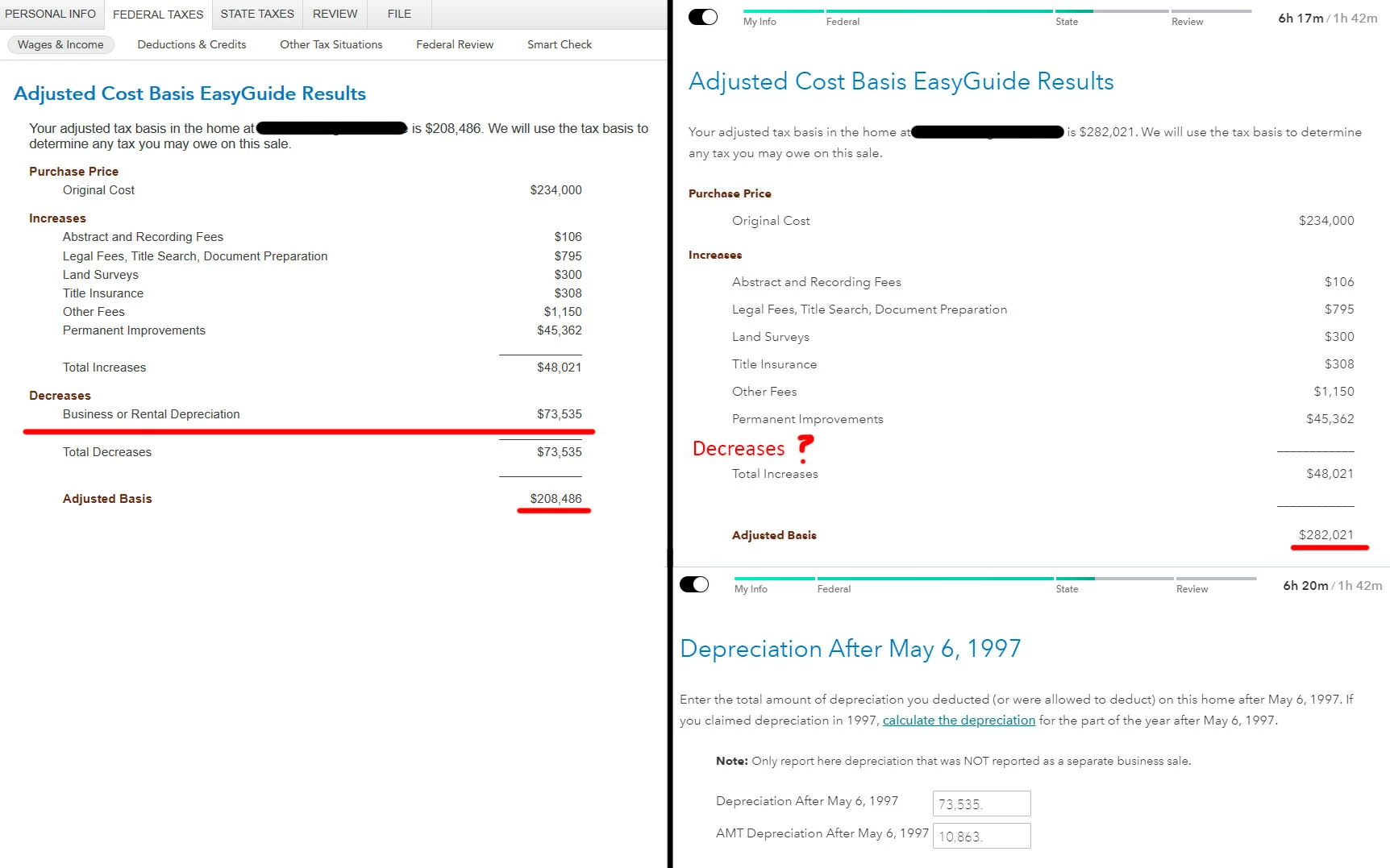
I had reason to use both the Desktop version and Online version of TurboTax which exposed a major bug in the EasyGuide functionality of the online version when entering home sales data. As you can see in the attached screenshots from both versions, the online version omits the depreciation realized as a rental property that was entered in the easy guide steps. This makes a huge difference in the taxes owed. I wish the online version of results were true, but unfortunately they would leave me liable to IRS audit, penalties, and interest.


For context, I have sold a primary residence that was used for as a rental property for 10 years prior to moving into it for 3 years. The amount of depreciation is a major factor in my tax liability. I don't think this is going to be a common scenario for must users, but could have been a major issue if I trusted the TurboTax Live's results.


My work around is to use the desktop version but this is a heads-up to those of you that are using the online version.
 

Best answer by AnnetteB6

In order to dig deeper into this situation and submit it for further investigation and correction, it would be extremely helpful to have a diagnostic copy of both your TurboTax Online file and the TurboTax Desktop file.  


The diagnostic file will not contain personally identifiable information, only numbers related to your tax forms.  If you would like to provide us with the diagnostic files, follow the instructions below and post the token number along with which version of TurboTax you are using and what states you are filing in a follow-up thread.  Please also designate which token came from which version of TurboTax - Online or Desktop.


Use these steps if you are using TurboTax Online:


  • Sign in to your account and be sure you are in your tax return.
  • Select Tax Tools in the menu to the left.
  • Select Tools.
  • Select Share my file with agent.
  • A pop-up message will appear, select OK to send the sanitized diagnostic copy to us.
  • Post the token number here. 


If you are using a CD/downloaded version of TurboTax, use these steps:


  • Select Online at the top of the screen.
  • Select Send Tax File to Agent.
  • Click OK.
  • Post the token number here.

1 reply

AnnetteB6Answer
March 17, 2024

In order to dig deeper into this situation and submit it for further investigation and correction, it would be extremely helpful to have a diagnostic copy of both your TurboTax Online file and the TurboTax Desktop file.  


The diagnostic file will not contain personally identifiable information, only numbers related to your tax forms.  If you would like to provide us with the diagnostic files, follow the instructions below and post the token number along with which version of TurboTax you are using and what states you are filing in a follow-up thread.  Please also designate which token came from which version of TurboTax - Online or Desktop.


Use these steps if you are using TurboTax Online:


  • Sign in to your account and be sure you are in your tax return.
  • Select Tax Tools in the menu to the left.
  • Select Tools.
  • Select Share my file with agent.
  • A pop-up message will appear, select OK to send the sanitized diagnostic copy to us.
  • Post the token number here. 


If you are using a CD/downloaded version of TurboTax, use these steps:


  • Select Online at the top of the screen.
  • Select Send Tax File to Agent.
  • Click OK.
  • Post the token number here.
**Say "Thanks" by clicking the thumb icon in a post**Mark the post that answers your question by clicking on "Mark as Best Answer"
k_merinoAuthor
March 19, 2024

Thank you for looking into the issue further.

Online Token: 1213008

Desktop Token: 1213009

March 19, 2024

Thank you for sharing your tokens for both the desktop and online versions.  


With the token numbers, I am able to open the tax file in the desktop version of the program to see the inputs and the forms generated.  When opening the token file created from the Online version, I can see that there was no prior depreciation entered for the house that was sold as you went through the Easy Guide to calculate the adjusted cost basis.  I think this entry was just missed for some reason as you went through that section.  I did verify that the input is available in the TurboTax Online Premium and Deluxe versions.  It comes up after a yes/no question regarding other uses of the property.


The screenshot that you shared showing that an amount was entered in TurboTax Online for depreciation taken after May 6, 1997 is a separate entry that comes up later in the section after the Easy Guide calculation.  The number entered on this screen is not part of calculating the adjusted cost basis through the Easy Guide.  That is why it wasn't included as a decrease on the summary screen showing the adjusted basis.    


Additionally, based on your other entries in the sale of the home section and stating that there had been prior business use of the home, an error condition was generated based on the allowed or allowable depreciation not being entered during the Easy Guide.  You would have been prompted to clear this error later in the process of filing the return.  When I cleared the error by including the amount for prior depreciation that had been entered in the desktop version, the total exclusion amount was the same for both versions of the program.  


@k_merino 

**Say "Thanks" by clicking the thumb icon in a post**Mark the post that answers your question by clicking on "Mark as Best Answer"




