
February 25, 2023
Solved

Cannot Import 1099 from Ally Financial into TT Desktop

  • February 25, 2023
  • 3 replies
  • 0 views

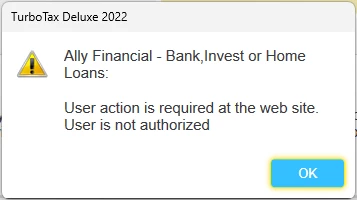
I'm using TurboTax Deluxe Desktop for Windows and have been able to import all my financial information EXCEPT for Ally Financial.  When I try to import from Ally, I get a message that says "User action is required at the web site. User is not authorized.".  I know my username and password are good because if I change them, I get a Login Error message from TurboTax. I have also logged into the Ally website and it is not waiting for any action from me.  Has anyone else seen this issue?


Thanks,

Rich


    Best answer by SteamTrain

    @richlux 

    Don't worry about being in the wrong section....we've seen this, and you are getting responses from some folks who know what they are doing....as best they can anyhow.


    Really though, if it just the 1099-INT from Ally Bank (not brokerage), and you have more than one account...like a MMarket or Checking/savings, and a couple CDs, then it wouldn't import properly anyhow...hasn't for years  (unless the blockage is them trying to fix that at the last minute).


    Just take your last-listed Ally 1099-INT that shows the sum total of all accounts, and enter that one 1099-INT into TTX manually.    Change How I enter my form...and Type it in myself.

    3 replies

    February 27, 2023

    For help with importing your 1099, please refer to the Troubleshooting drop-down near the end of this Help Article:  What if I can't import my 1099? - Intuit


    If you need additional help, we can better assist you over the phone.  To speak with a TurboTax Expert, refer to the instructions here:  How do I contact TurboTax?

    **Say "Thanks" by clicking the thumb icon in a post**Mark the post that answers your question by clicking on "Mark as Best Answer"
    richluxAuthor
    February 27, 2023

    Thanks, but that article didn't really help. I've already double checked that the 1099 is available and my login is correct, etc.  I've also already spoken to TurboTax and they were not very helpful. The person I spoke to had no idea what this particular message meant and they told me to post on the community to see if anyone else has experienced it.


    Thanks, 

    Rich

    Employee
    February 27, 2023

    Try using a different browser. If that doesn't resolve this experience, please respond to this thread for further assistance. 

    **Say "Thanks" by clicking the thumb icon in a post**Mark the post that answers your question by clicking on "Mark as Best Answer"
    richluxAuthor
    February 27, 2023

    I'm using the desktop version of the software, so there's no browser involved. The desktop software does the import.


    The problem appears to be the response it's getting back from Ally Financial. TT is correctly logging in to my account, but displays the message I posted above. It really seems like there's something wrong with my account at ally, but I spoke with them and they claim everything is correct.


    I also just realized that this might not be posted in the right topic area in the community, but I don't know how to move it.


    Rich 

    SteamTrain
    Employee
    February 28, 2023

    @richlux 

    Don't worry about being in the wrong section....we've seen this, and you are getting responses from some folks who know what they are doing....as best they can anyhow.


    Really though, if it just the 1099-INT from Ally Bank (not brokerage), and you have more than one account...like a MMarket or Checking/savings, and a couple CDs, then it wouldn't import properly anyhow...hasn't for years  (unless the blockage is them trying to fix that at the last minute).


    Just take your last-listed Ally 1099-INT that shows the sum total of all accounts, and enter that one 1099-INT into TTX manually.    Change How I enter my form...and Type it in myself.

    ____________*Answers are correct to the best of my knowledge when posted, but should not be considered to be legal or official tax advice.*
    February 20, 2024

    I am having the same issue, but I have 1099-B sales.  Many of them.  Ally just posted the 1099's Friday, but, this is a real pain.

    February 20, 2024

    This happens occasionally.


    First, try clearing your browser's cache and deleting your cookies, then see if you can continue where you left off.  See the TurboTax Help articles How to clear your cache and How do I delete cookies? for guidance.


    If this isn't helpful, see the following TurboTax Help articles for potential fixes:

    @seqhort




