June 10, 2020
Solved

Confused about entering K-1 Info

  • June 10, 2020
  • 5 replies
  • 0 views

The section 199A information for box 20 code Z on several of my K-1 1065 forms has 5 apparently separate sections; one 'Rent' with one value and four 'Passthroughs' with three to four entries each (Rental Income, Other Deductions, W-2 Wages, and Unadjusted Basis of Assets).  How do I enter all of these for each K-1? If I check "The income comes form another business" TurboTax only allows one Rent or Passthrough entry.

Also, what amount do I enter for the "Enter Box 20 Info Z - Section 199A Information"?  I currently left it blank. Thanks!

Best answer by DavidS127

Because your K-1 is reporting Section 199A information generated by the partnership and Section 199A information generated by multiple passthrough entities, you'll need to "split" this K-1 into separate K-1s for entry into TurboTax.  Enter one K-1 with only the "box" amounts generated by the "main" partnership, and additional K-1s for each passthrough entity with only the "box" amounts generated that particular passthrough entity.   


For all these K-1s, when you begin the K-1 entry use the same identifying information for the "main" partnership that sent you the K-1 (e.g., name of partnership, address, EIN, etc).


If you can't figure (deduce) that "split" from the information you have, you will need to contact the preparer of the K-1 to get those amounts.


You answer the "Is the business that generated the Section 199-A income a separate business owned by the partnership?" question as it applies to each separate K-1 you enter.   In other words, on the "main partnership" K-1 you enter you will answer that it is "from that business", and on the others you will enter that it is from "a separate business owned by the partnership".  TurboTax will ask for the name and EIN of each passthrough entity.


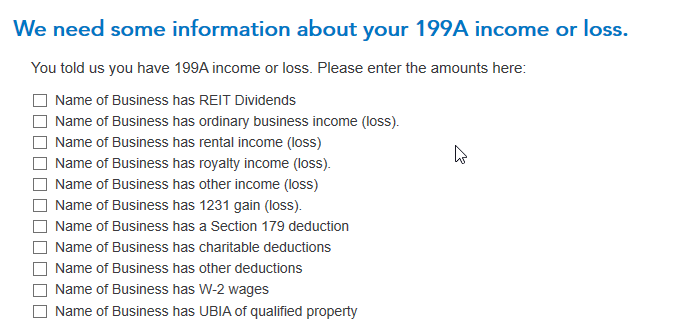
To enter the Section 199A Statement information for each K-1, enter the code Z when you enter the K-1 box 20 screen, but you don't need to enter an amount on that screen.  Continue on, and you'll eventually find the screen  "We need some more information about your 199A income or loss".  When you check the box next to a category on that screen, a place will open up to enter the amounts from the Section 199A Statement or STMT that came with your K-1.  The applicable category (or categories) on this screen (and the following "Let's check for some uncommon adjustments" screen, if applicable) must be completed in order for your K-1 QBI information to be correctly input into TurboTax. 


To get back to the K-1 summary screen to edit or add a K-1, click the "magnifying glass Search" icon on the top row, enter "k-1" in the search window and press return or enter, and then click on the "Jump to k-1" link.


Here are the "We need some information about your 199A income or loss" and "Let's check for some uncommon adjustments" screens where you enter the information from your K-1 Section 199A Statement/STMT:
5 replies

DavidS127
DavidS127Answer
June 11, 2020

Because your K-1 is reporting Section 199A information generated by the partnership and Section 199A information generated by multiple passthrough entities, you'll need to "split" this K-1 into separate K-1s for entry into TurboTax.  Enter one K-1 with only the "box" amounts generated by the "main" partnership, and additional K-1s for each passthrough entity with only the "box" amounts generated that particular passthrough entity.   


For all these K-1s, when you begin the K-1 entry use the same identifying information for the "main" partnership that sent you the K-1 (e.g., name of partnership, address, EIN, etc).


If you can't figure (deduce) that "split" from the information you have, you will need to contact the preparer of the K-1 to get those amounts.


You answer the "Is the business that generated the Section 199-A income a separate business owned by the partnership?" question as it applies to each separate K-1 you enter.   In other words, on the "main partnership" K-1 you enter you will answer that it is "from that business", and on the others you will enter that it is from "a separate business owned by the partnership".  TurboTax will ask for the name and EIN of each passthrough entity.


To enter the Section 199A Statement information for each K-1, enter the code Z when you enter the K-1 box 20 screen, but you don't need to enter an amount on that screen.  Continue on, and you'll eventually find the screen  "We need some more information about your 199A income or loss".  When you check the box next to a category on that screen, a place will open up to enter the amounts from the Section 199A Statement or STMT that came with your K-1.  The applicable category (or categories) on this screen (and the following "Let's check for some uncommon adjustments" screen, if applicable) must be completed in order for your K-1 QBI information to be correctly input into TurboTax. 


To get back to the K-1 summary screen to edit or add a K-1, click the "magnifying glass Search" icon on the top row, enter "k-1" in the search window and press return or enter, and then click on the "Jump to k-1" link.


Here are the "We need some information about your 199A income or loss" and "Let's check for some uncommon adjustments" screens where you enter the information from your K-1 Section 199A Statement/STMT:

**Say "Thanks" by clicking the thumb icon in a post**Mark the post that answers your question by clicking on "Mark as Best Answer"
June 12, 2020

On my K-1, Box 20 says Z - *STMT"


On the explanation statement are included (1) Ordinary Income (Loss), (2) Self-employment earnings (Loss), Health insurance payments, W-2 Wages.

When I enter these items and amounts on the Code Z Section 199A worksheet, they add up properly and the total populates onto the return.  However, the Code Box which says Code Z continues to be highlighted in pink (not yellow), and the amount is also pink.   Obviously, I am doing something wrong as neither the Code info nor the total are being accepted.  When I attempt to file the return, I am told that more information is needed  and I end up right where as was before - i.e., at the screen where the Code is highlighted in pink and and also the total from the worksheet remains pink.

What the heck am I doing wrong???


DavidS127
June 18, 2020

Enter the code Z when you enter the K-1 box 20 screen, but you don't need to enter an amount on that screen Continue on, and you'll eventually find the screen  "We need some more information about your 199A income or loss".  When you check the box next to a category on that screen, a place will open up to enter the amounts from the Statement or STMT that came with your K-1.  The applicable category (or categories) on this screen (and the following "Let's check for some uncommon adjustments" screen, if applicable) must be completed in order for your K-1 QBI information to be correctly input into TurboTax. 
 
To get back to the K-1 summary screen and find the Schedule K-1 to edit, click the "magnifying glass Search" icon on the top row, enter "k-1" in the search window and press return or enter, and then click on the "Jump to k-1" link to find the K-1 you need to edit.
 
Here are screenshots of the "We need some information about your 199A income or loss" and "Let's check for some uncommon adjustments" screens where you enter the information from your K-1 Section 199A Statement/STMT:

@fngleaton

**Say "Thanks" by clicking the thumb icon in a post**Mark the post that answers your question by clicking on "Mark as Best Answer"
CaliBobAuthor
June 14, 2020

Thank you for that thorough answer.  Just one quick clarification.  When you say:


"Enter one K-1 with only the "box" amounts generated by the "main" partnership, and additional K-1s for each pass-through entity with only the "box" amounts generated that particular pass-through entity."


are the "box" amounts for both "main" and pass-through, from boxes 1 through 20 on the main title sheet or are the boxes for the pass-through entities the 3-4 items listed for each pass-through (checking the appropriate boxes for "We need some information about your 199A income")?  Thanks again for your help!

April 10, 2021

DavidS127 your information so far has helped a lot. 


I have a similar case and there is only one remaining doubt I have. You say that we should split the K-1 into separate K-1s for entry into TurboTax. The statement attached with my K-1 has all the information I need to split boxes 1-20 between main and pass-through entities but I do not know whether I should also split the information in Part II, section L of the K-1. In TurboTax, this information is requested in the screen Enter Capital Account Information".


In my case, the aggregated fake numbers are:


Capital Contributed During 20XX10,000
Current Year Net Income (Loss) 8,000
Ending Capital Account 2,000
 
From the statement in my K-1 I can see how the loss was split but it doesn't say anything about the Capital Contributed so for this section I don't know if I should try to split the numbers or keep them aggregated and repeat them in each K-1 entry in TurboTax. Could you please help me figure out how to get this information correctly? 
 
Thanks!


April 14, 2021

I'm invested through a Schwab brokerage, and they have told me they will submit my K-1 forms and have already filed an Extension Request on my behalf because they are still collecting information from the issuer.  This is a new experience; they claim it's due to a change in the tax law for 2020 returns.  Does anyone else have this situation?  I've already submitted my return with my two K-1 forms as they were sent to me.  I'm not getting much clear info from Schwab or my broker.

March 19, 2023

Hi, my K-1 shows two entities under Line 20 Z, but one of the two entities shows $0 for every line item; I'm assuming I don't need to enter this information.  The 2nd entity show some data on two line items (see below).  I'm assuming I would have to add these numbers (-$11 and 287).  Does this mean I only file one K-1 line entry for this in the "Enter Box 20" info (2nd image below in turbotax online) ?


Also,

I see this note that lists several states with activity.  Do I need to file a separate state tax filing for each of the states below?

March 19, 2023

Also, to follow-up, I live in Virginia

March 19, 2023

The first entry, for -$11, you should enter in box 20 as code "Z" Section 199A information. Later on you will see a screen that says We see you have Section 199A income, and you would normally choose the The income comes from the partnership that generates this K-1, unless you know otherwise. On the next screen you will see We need some information about your 199A income, on which you will check the box Partnership has UBIA of qualified property, and the you will see where you can enter the $287 amount for UBIA of qualified property.

**Say "Thanks" by clicking the thumb icon in a post**Mark the post that answers your question by clicking on "Mark as Best Answer"




