
March 15, 2021
Question

Form 4562 - Rental property depreciation and amortization

  • March 15, 2021
  • 3 replies
  • 0 views

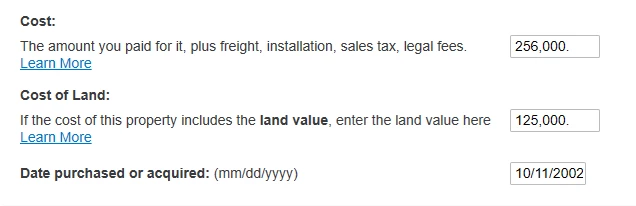
For 2019, i had form 4562 with my rental property depreciation and amortization that i can add but i dont see the form anywhere so, i am wondering if someone can explain if this is the same in the pic and what information is required because TT doesn't really explain what amount goes in this section? I understand the cost of Land and i can get that from county site and date purchased will be date this property was purchased...correct? What about the cost? What's this cost? I just put in some numbers below but that's not accurate. Thanks
 

3 replies

rm1177Author
March 16, 2021

Can anyone help with this question? Thanks

March 16, 2021

@rm1177 If you transferred your info from 2019, TurboTax fills in the 2020 depreciation amount for you; you don't need to enter anything.


The Accumulated Depreciation is shown on Form 4562, which is for your information each year.


If the Accumulated Depreciation amount did not transfer for you into 2020, use the amount from your 2019 Form 4562, Deprciation Report. 


If you are re-entering your Rental Property as an Asset (because it did not transfer), use the same amounts for Cost Basis/Land as you did when you started renting in 2002.


You can find this info on your Asset Entry Worksheet for 2019 (screenshot), and also on your 2019 Depreciation Report


Click this link for more info on Rental Property Cost Basis


rm1177Author
March 16, 2021

It did not enter this info from 2019 but added other data such as expenses etc. for rental from 2019. I am not sure why but here is the thing, I bought this property in 2002 and started renting in 2019 so, what should i enter below for cost and cost of land? Should i enter the appraised 2020 value from county site including land value? Thanks a lot


and 

Carl11_2
Employee
March 16, 2021

The only time you enter the property and/or any other assets in the assets/depreciation section, is in the tax year that property and/or asset is first placed "in service" as rental property or rental property asset. You do not enter the same asset each year.

After you enter the property that first year, it will be "automatically" imported into the turbotax program in the next year *IF* you use the same exact account that you used the previous year, to prepare the previous year tax return. This is a "MUST" in order to import anything from the prior year's tax return.

If using the CD version of the program, then the prior year tax file (will have a .tax2019 filename extension) must be in the documents/turbotax directory of the computer you installed TurboTax 2020 on. Then the CD version of the 2020 program will automatically import last year's data from that .tax2019 file.


March 24, 2022

I have always used The CD version. In all past years the new year searches for previous year file and transfers all info.  The year 2021 the only thing that transferred for my rental was the net income. Nothing shows up as an existing rental property.

March 24, 2022

@John4347 please contact us via phone so one of our customer service representatives can walk you through transferring your previous return.  They can assist with issues that may arise. 

**Say "Thanks" by clicking the thumb icon in a post**Mark the post that answers your question by clicking on "Mark as Best Answer"
April 2, 2022

i have used turbo tax disc for years but this is first time I have downloaded turbo tax.  I have to populate everything on rental depreciation from past years.  I am unable to locate how to put in info on Form 4562 and I don't know if it will automatically fill in information in rental area for this year  

April 2, 2022

If your Rental Property assets and depreciation didn't transfer properly from your 2020 return, you may need to re-enter them in the Sale of Property/Depreciation section under Rental Property.  Make sure your property info carried over to the Property Profile section first.


Use your original 'Date in Service' and 'Cost' and TurboTax will calculate depreciation for you on Form 4562 for each asset.  The 'Depreciation and Amortization Report' (landscape form) from 2020 can help you. 


The download version of TurboTax operates  the same as the CD version.


@cecile hanus

April 18, 2022

@mglauner Hello, I would really appreciate some advice. I had a rental property from 2006. The depreciation form 4562 for the last 15 years had 0 in the Land value. The Cost (net land) value is lower than the purchase cost. The property was sold in 2021. Is there any way to add the land value now to include in calculation of Cost Basis?


Also, where to add the expenses, related to the original purchase of the house?




