
April 10, 2023
Solved

How to fix double counted capital gains?

  • April 10, 2023
  • 1 reply
  • 0 views

I am using TurboTax 2022 Premier on Windows 10 and have an erroneously double counted short-term gain on both my already filed Federal and already filed Alabama tax returns.


My Federal return shows the same short capital gain on two separate copies of Form 8949. My return actually contains 3 of these forms, but the issue only involves two of them. A short-term gain of $6,020 is included on two of these forms, and the gain is double counted. The IRS has already deposited my check, yet this double counting caused me to make that additional payment when I should have received a refund. How do I fix this and get a refund?


The $6,020 is shown on a 1099-B from Vanguard in a section that indicates, “Report on Form 8949, Part I with Box B checked. Basis is NOT provided to the IRS.” I also have a Schedule K-1 (Form 1065) for this same holding, Shell Midstream Partners (SHLX), which I bought in 2021 and that was later acquired by another firm resulting in short term gain for me in 2022. Both the 1099-B and K-1 forms were imported into TurboTax.


This resulting double counting is evident on Schedule D and then Form 1040 on my federal return. It is easy to see that the same transaction appears twice on my Alabama Form for Schedules D&E (form 40).


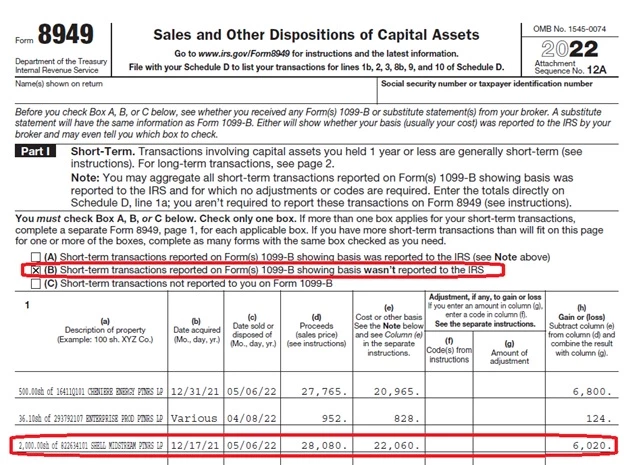
One form 8949 has box B checked for short-term transactions reported on form(s) 1099-B showing basis wasn’t reported to IRS. This form includes a sale of 2,000 shares of Shell Midstream Partners LP. The data acquired is shown as 12/17/21 and the date sold is shown as 5/6/22. The proceeds are shown as 28,080 and the cost is shown as 22,060. The gain is shown as 6,020. Note that the three transactions shown on this form (the one with box B check) add up to 12,944. [12,944 = (6,800 + 124 + 6,020)].
 

A second form 8949 has box C checked for short term transactions not reported to you on Form 1099-B. This form includes a sale of 2,000 shares of Shell Midstream Partners LP. The data acquired is shown as 12/17/21 and the date sold is shown as 5/6/22. The proceeds are shown as 28,080 and the cost is shown as 22,060. The gain is shown as 6,020.
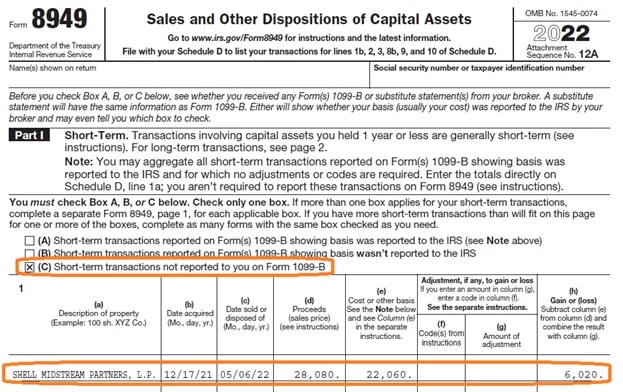
This second Form 8949 (with box C checked) shows only the Shell Midstream Partners, L.P., transaction. The $6,020 is counted on this form, and that appears to be the error, as the 1099-B from Vanguard indicated that it should be shown on a form with box b checked, which is not the case here.


The form 8949 with box C checked includes only the $6,020.

The form 8949 with box B checked also included the $6,020 in the total. [12,944 = (6,800 + 124 + 6,020)].

Schedule D shows both the amount from the form 8949 with box C checked and the form 8949 with box B checked.

03-Schedule D.jpg


The overall total gains shown on Schedule D line 16 also appears on Form 1040 line 7.

On my Alabama “SCHEDULES D&E (FORM 40)” the $6,020 is shown twice and the total at the bottom of that form matches the gains shown on the Federal Schedule D line 16 that also appears on Form 1040 line 7.

04-AL-scheds-D-E.jpg


How do I fix this double counting and get a refund?


Thank you for your consideration!

    Best answer by nexchap

    @Gordon3 When you filled out the K-1 interview, there's a screen where it asks about the sale.  Did you enter the sale information there?  Unfortunately, if you did the K-1 interview creates a 1099-B (code C or F) that will duplicate the one you received from your broker.


    To fix this you'll need to amend your return.  Go back and edit the K-1.  On the sale screen, you'll make entries that calculate to $0 Cap Gain.  Do that by:

    • If you don't have any Ord Gain (Gain subject to recapture....), just enter 0 for everything.
    • If you do have Ord Gain, you'll have a value for 'Regular' and a value for 'AMT'.  Enter them on the appropriate line, and then for basis enter the inverse (e.g., if Ord Gain is $30, enter -$30 for basis).  You still enter $0 for sales price.

    Doing this will ensure that the K-1 interview doesn't create a 1099-B, allowing you to report you Cap Gain on the broker 1099-B you already entered.

    1 reply

    nexchapAnswer
    April 10, 2023

    @Gordon3 When you filled out the K-1 interview, there's a screen where it asks about the sale.  Did you enter the sale information there?  Unfortunately, if you did the K-1 interview creates a 1099-B (code C or F) that will duplicate the one you received from your broker.


    To fix this you'll need to amend your return.  Go back and edit the K-1.  On the sale screen, you'll make entries that calculate to $0 Cap Gain.  Do that by:

    • If you don't have any Ord Gain (Gain subject to recapture....), just enter 0 for everything.
    • If you do have Ord Gain, you'll have a value for 'Regular' and a value for 'AMT'.  Enter them on the appropriate line, and then for basis enter the inverse (e.g., if Ord Gain is $30, enter -$30 for basis).  You still enter $0 for sales price.

    Doing this will ensure that the K-1 interview doesn't create a 1099-B, allowing you to report you Cap Gain on the broker 1099-B you already entered.

    **Say "Thanks" by clicking the thumb icon in a post**Note also, I'm not a Tax Preparer/CPA. Just a volunteer, seasoned, TurboTax user. Use any advice accordingly!
    Gordon3Author
    April 11, 2023

    @nexchap 


    Thank you for the response. That does make sense and seems very helpful.


    K-1’s have caused me more difficulty than anything else regarding TurboTax.


    I thought I had imported the data for that SHLX K-1, so I checked. On the TurboTax “File” menu I chose “Remove Imported Data” and I see two other K-1’s (and my W-2, various 1099’s, etc.). I do not see the K-1 for this SHLX. Evidently I typed the data in via the interview. I recall this being the last form that I needed prior to filing. When I originally downloaded, I obtained a PDF, but I did not have a “*.txf” file, so again, I must have typed it in.


    I plan to try two approaches to see what I can learn about this.

    • Today I was able to download a “*.txf” file. So if I have to do amended returns, one option would be to just delete the old K-1 and import from the “*.txf” file.
    • Another option is to do as you described; that is to go to the “Enter Sale Information” part of the interview and clear all the values.
      • In the “Regular Gain or Loss” column I see the “Sale Price” [28,080] and the “Partnership Basis” [22,060]. The difference is 6,020.
      • In the “AMT Gain or Loss” column, there is also a “Partnership Basis” [22,060].

    I do not see the extra 1099-B, but I do see Form 8949 with Box C checked.


    It’s rather late, so I will come back to this in a day or so.


    Thanks again!

    April 11, 2023

    @Gordon3 I don't have any recent experience importing K-1s -- it was glitchy in the past so I always input them through the interview.  I have no idea how TT will handle the sale if you just do an import.


    From your response, I assume SHLX didn't report any 'Gain Subject to Recapture' (aka Ordinary Income or Ordinary Gain).  If it did, that must be entered on the sale screen, since its the only way to get it to report on Form 4797.


    And where I mentioned a 1099-B -- I meant an entry on form 8949.  The entry you see checked with a 'C' is from the K-1.


    Just to cover all the bases, you're adjusting the basis reported on your 1099-B from the broker, right?  You didn't mention it, but that's another area that routinely comes up on these K-1 vs TT threads.

    **Say "Thanks" by clicking the thumb icon in a post**Note also, I'm not a Tax Preparer/CPA. Just a volunteer, seasoned, TurboTax user. Use any advice accordingly!




