
March 11, 2023
Question

My investment accounts not showing up in TurboTax Premier review process

  • March 11, 2023
  • 1 reply
  • 0 views

Hi, first time using TurboTax desktop; first time doing taxes myself. 


I've got 5 investment accounts. I've uploaded the 1099s to TurboTax. I've printed out my 1040 (with recommended worksheets). I'm now working my way through the TurboTax review process with 1040 in hand.


On the review tab, "Federal Taxes, Wages & Income", on the page titled, "Here's all the investment accounts we have so far", I find TurboTax showing only 2 of my 5 investment accounts. See screenshot below -


InvestAccts_01.png 


The 3 missing investment accounts, however, are showing up on the print out of my 1099 Sched B. 


So, my first problem is that the TurboTax review process isn't aligned correctly with what its putting on my 1099.


As I said, I've got 5 investment accounts. My second problem is that on the 1099, while the 5 are correctly showing up, on the other hand, there are 2 more accounts listed—a total of 7 accounts.


In the screen grab of my 1099, Sched B, below, the zeroes in the amount column line up with the 2 accounts "invented" by TurboTax.  
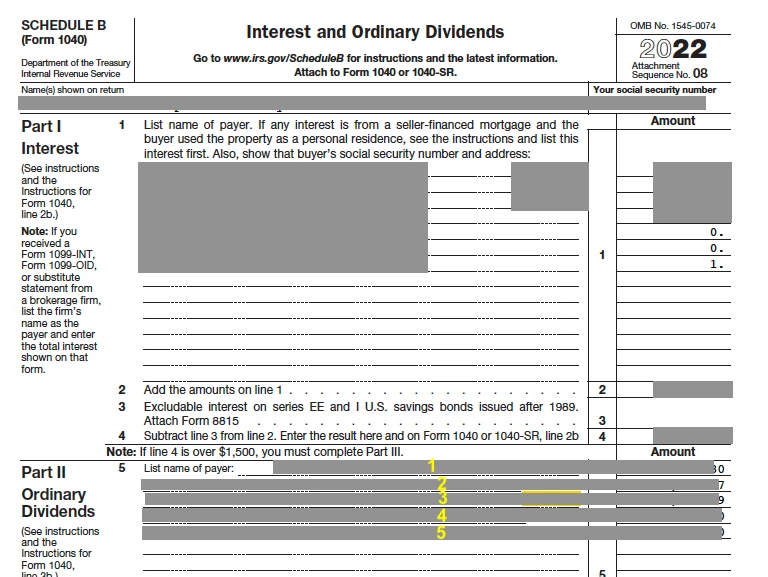


Question: (1) Can someone help me troubleshoot TurboTax, so that the review process aligns with what's on the 1099?

Question: (2) Can I delete the 2 "dummy" accounts which don't belong to me? I wish to eFile. Can I edit the 1099, without forfeiting my ability to eFile?


Thank you in advance


    1 reply

    Idaho47Author
    March 11, 2023

    It seems my first screenshot didn't load -- here it is


    AliciaP1
    March 11, 2023

    Yes, you can edit the 1099s by using the Edit button on your screenshot.  The actual 1099 information does not get submitted to the IRS from your entries.  The IRS only sees your Schedule B information.  The "dummy" accounts that populated from your import somehow can be deleted in forms mode.  


    To change your Schedule B and delete the $0 rows on a Mac you can follow these steps:

    1. Sign in to your TurboTax account
    2. Switch to Forms Mode by selecting the Forms icon
    3. From the menu, select the Schedule B
    4. Click in the boxes on the form for the $0 rows and remove the entries
    **Say "Thanks" by clicking the thumb icon in a post**Mark the post that answers your question by clicking on "Mark as Best Answer"
    Idaho47Author
    March 12, 2023

    AlicaP1, thank you for fielding my query. Thanks for directing me to "forms mode". After studying the structure of "forms mode", I now have a guess about why, when I only have 5 investment accounts, TurboTax is showing 7 investment accounts on my Sched B.


    My guess is uneducated. If in your educated experience, you can tell me if I'm correctly interpreting how TurboTax populates 1099 information  to the Sched B, I'd be grateful to you. If my interpretation is in the weeds, then I'd be happy to be corrected, as well.


    For clarity, to repeat, my problem is that I only have 5 investment accounts but I find 7 entries on my Sched B. Here is the screen grab I posted earlier, revised for clarity —


    Now, after studying the "forms mode" tab of TurboTax, I think I might see what's going on here. If I've got this right, TurboTax is showing two accounts (see screenshot below, "Acct A" and "Act B") twice on Sched B under Interest. It is showing those accounts, first, as "Interest Income", and then again, as "OID-interest income".  See below —


    Is my guess correct? On the Sched B, under Part I Interest, does TurboTax populate to that list of payers, the same investment account, twice — listing the account first for Interest Income; then listing the same account a second time for OID-interest income?


    Thank you




