
February 24, 2024
Question

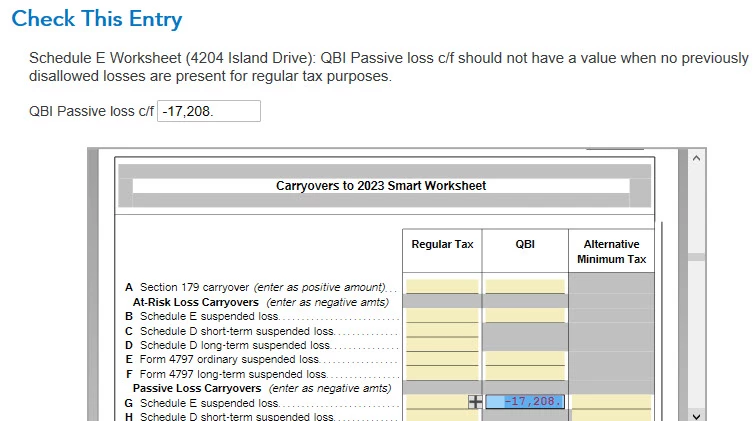
QBI passive loss error

  • February 24, 2024
  • 3 replies
  • 0 views

How do I fix this error? I put -17208 in the regular tax column and error went away, but I don't think that's correct.  -17208 came from 2022.  The difference between regular tax and QBI.  So I need the regular tax number?? 
    3 replies

    AmyC
    Employee
    February 28, 2024

    Yes. A QBI loss is generated when SCh E has a loss. You have an entry for QBI showing with no entry for Sch E loss showing.


    Look at form 8582, page 2, part VII. You see a line item there. The first column shows name of activity and the second column shows form or schedule.

    If you have first column, second column, last column:

    • Rental, schedule E, unallowed loss - put that number in your Sch E regular tax carryover box
    • Rental, Form 6251  (the AMT form), unallowed loss - that would be the AMT number to use.
    • Rental, Form 8995, unallowed loss - that is the number for QBI carryover


    You may not have any or all of these lines. You may not have any carryover. If you form is blank like the one shown here, there is nothing to enter. I suspect you at least have an entry for regular carryover and maybe QBI exists as well.


    **Say "Thanks" by clicking the thumb icon in a post**Mark the post that answers your question by clicking on "Mark as Best Answer"
    March 2, 2024

    Form 8995 shows my loss for this year.  Form 8582 is blank.  It is unclear which number to use in form 6251.

    March 3, 2024

    OK, finally figured it out.  I went to rental properties, under property profile I hit update and said Yes to I have passive activity... under Carryovers.  I entered data found in:


    Form 8582 Part VII (a) Loss in 2022 taxes and enter the allocation of Unallowed Losses in the Passive Losses from prior Years as regular Tax Carryover.  In the AMT carryover I subtracted 80 from my regular tax loss which I found in form 6251 of 2022 taxes.  QBI carried over from 2022.  


    I hope this is now accurate. 


    I was disappointed, I actually called Turbo Tax and they were no help at all with this.  

    AmyC
    Employee
    March 7, 2024

    It sounds great. It took me a couple or re-reads and then it clicked why you were subtracting 80. Great job! File and have a great year!

    **Say "Thanks" by clicking the thumb icon in a post**Mark the post that answers your question by clicking on "Mark as Best Answer"
    March 8, 2024

    Thank you

    January 27, 2025

    Now, I really think Turbo tax has an bug/error as I seeing the Exact same error with the same amount in 2024?????

    PatriciaV
    Employee
    January 29, 2025

    It would be helpful to have a TurboTax ".tax2024" file to test this issue further.


    If you would be willing to send us a “diagnostic” file that has your “numbers” but not your personal information, please follow these instructions: 


    In TurboTax Desktop, open your return and go to Online in the TurboTax header. (On a Mac computer, choose File >> Share.)

    1. Choose Send Tax File to Agent.
    2. You will see a message explaining what the diagnostic copy is.  Click Send on this screen and wait for the Token number to appear. 
    3. Reply to this thread with your Token number and tag (@) the Expert requesting the token from you. 
    4. Please include any States that are part of your return - this is VERY important. 

    We will then be able to see the same experience you are having. If we are able to determine the cause, we'll reply here and provide you with a resolution. 

    **Say "Thanks" by clicking the thumb icon in a post**Mark the post that answers your question by clicking on "Mark as Best Answer"




