
June 2, 2024
Question

Rental depreciation not calculating into taxes due summary

  • June 2, 2024
  • 2 replies
  • 0 views

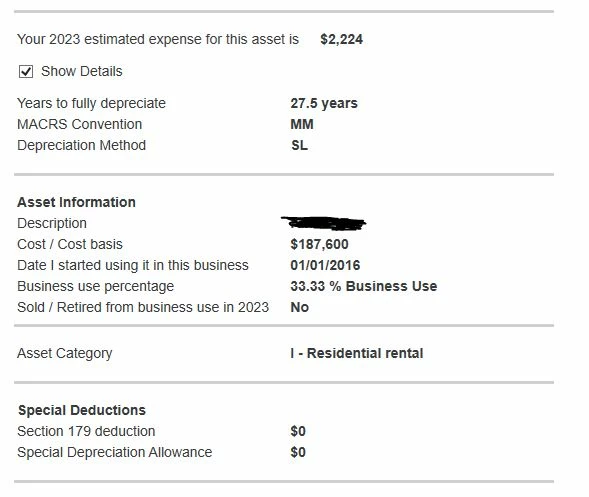
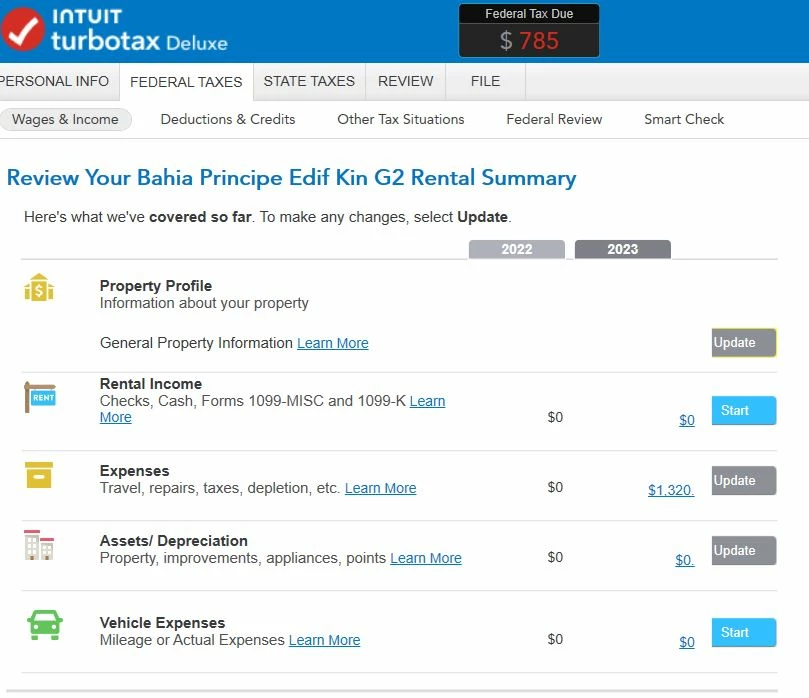
I have gone through the asset depreciation for my short term rental unit. The depreciation details page shows a depreciation expense of 2,224. However, when looking at the unit Rental Summary, the asset/depreciation line shows 0. I checked schedule E line 18, and the 2,224 is included there. However, I am struggling to see how this number is changing my Federal Tax Due. It looks like depreciation is not being calculated into the number as it is not being reduced when I finalized the depreciation tab. Anyone else having the same issue or figures out how to fix this?

*Note: the rental income is 0 in the screenshot as i was playing around with this number to see if it would have any effect on depreciation. It does not.
 

    2 replies

    Employee
    June 2, 2024

    Have you checked your Schedule E Worksheet in Forms Mode?


    Your immediately deductible expenses will not take your net rental loss below zero ($0).


    Untitled.png

    bcasaliAuthor
    June 2, 2024

    I made some updates to the property details (forgot to tick it was located outside the US) and looked at the worksheet and see this. The depreciation calculation changed a bit, and it shows in the Schedule E worksheet, but it shows as 0 in the "reported on Schedule E" column. Any idea why? 

    Employee
    June 2, 2024

    @bcasali wrote:

    ......it shows in the Schedule E worksheet, but it shows as 0 in the "reported on Schedule E" column. Any idea why? 


    Vacation home loss limitation per Section 280A; depreciation deductions abate after all other expenses. Once expenses bring the income down to $0, other deductions abate (are not allowed in the current tax year).

    June 6, 2024

    @bcasali wrote:

     my short term rental unit.


    Your short-term rental that is outside of the US should be depreciated over 40 years, not 27.5 or 30 years.  You may want to go to a tax professional to correct things.


    Employee
    June 6, 2024

    @AmeliesUncle 


    LOL - missed the "Bahia...." at the top of the first screenshot entirely.


    Thanks!




