April 9, 2024
Solved

Rental loss carryover

  • April 9, 2024
  • 1 reply
  • 0 views

I have some rental loss from previous year and this year, form 8995 line 3 and 8582 line 1c showed the loss and also offset by this years gain.  However, the loss is not showing up in schedule E line 22 as deductible.  If I manually enter passive loss, the deductible will show on schedule E.   My question is, why is turbo tax not automatically taking the loss from previous year and deduct.  Is manually entering it the correct way?

Best answer by DianeW777

Yes, you must enter your passive activity loss (PAL) carryover in your rental property.  It is something you need to verify each year and make sure it's included with your rental activity until it is used up (this will happen when the property is sold if not before).


The following instruction should help you with the location to enter your carryover loss.  You must go into the rental property income section first, then follow the steps to enter your carryover loss.


  1. Any passive activity loss (PAL) carryforwards allowed would be listed on your Form 8582, Worksheet 5 or 6, in your 2022 tax return as 'unallowed loss'.  If you have a PAL and it does not seem to be populated in your 2023 tax return you can take the following steps to enter it.
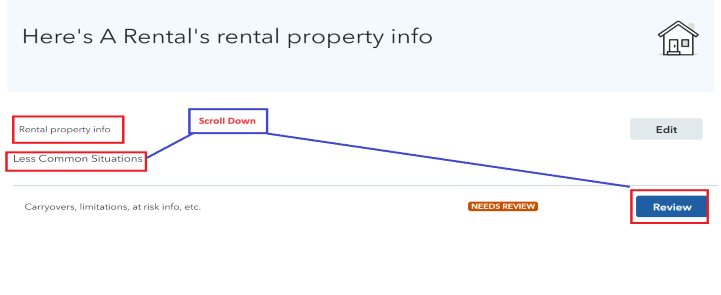
    • Use the magnifying glass to Search (upper right) > Type rentalsJump to Rentals > Select Edit beside your Rental Activity  > Under Less Common Situations > Review Carryovers, limitations, at risk info, etc. > Continue to enter your passive loss carryover.  See the image below for assistance.
1 reply

DianeW777Answer
April 9, 2024

Yes, you must enter your passive activity loss (PAL) carryover in your rental property.  It is something you need to verify each year and make sure it's included with your rental activity until it is used up (this will happen when the property is sold if not before).


The following instruction should help you with the location to enter your carryover loss.  You must go into the rental property income section first, then follow the steps to enter your carryover loss.


  1. Any passive activity loss (PAL) carryforwards allowed would be listed on your Form 8582, Worksheet 5 or 6, in your 2022 tax return as 'unallowed loss'.  If you have a PAL and it does not seem to be populated in your 2023 tax return you can take the following steps to enter it.
    • Use the magnifying glass to Search (upper right) > Type rentalsJump to Rentals > Select Edit beside your Rental Activity  > Under Less Common Situations > Review Carryovers, limitations, at risk info, etc. > Continue to enter your passive loss carryover.  See the image below for assistance.

**Say "Thanks" by clicking the thumb icon in a post**Mark the post that answers your question by clicking on "Mark as Best Answer"




