
April 10, 2022
Question

Schwab 1099-b error with less than 10000 transactions

  • April 10, 2022
  • 1 reply
  • 0 views

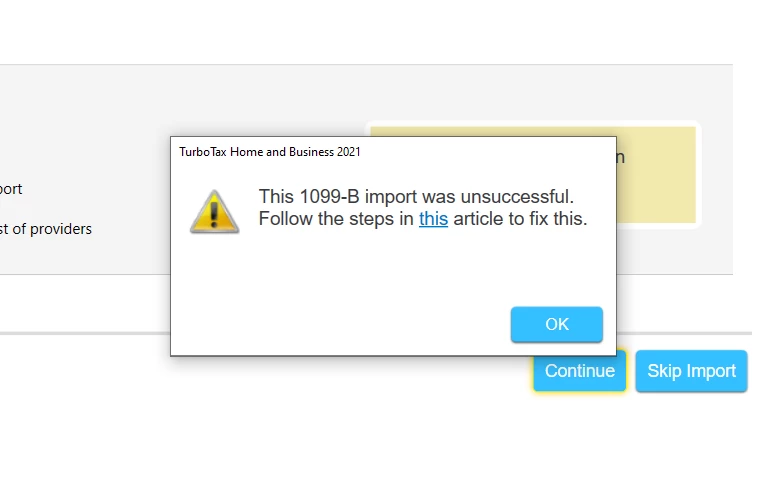
I have an issue connecting my TurboTax home and business desktop app to Schwab to import my 1099-b.  i spent many hours on the phone with support to explain the issue and troubleshoot. Eventually, i got help with second tier support and a case opened to fix the issue. This week i received an email saying the issue has been fixed.  But when I try to import the Schwab 1099-b I now get a  new error : "This 1099-B import was unsuccessful. Follow the steps in this article to fix."

That article only says if you have more that 10,000 transactions, Turbo tax cannot import, but i checked and i have less that 10k transactions, so  should be able to import the 1099-b. 

The alternative offered to use the summary amounts is not feasible as it asks me to send my statement with individual transactions to the IRS and that is several hundred pages.  How can get this fixed or get a refund of my turbo tax cost?

I had a similar issue last year and had to be on support for several hours, but eventually TurboTax had an update with a fix.

I have seen some suggestions to use Tax Act , as that program allows you to attach a pdf of the 1099-b and you don't have to mail the statements.

Does anyone know if Tax Act can import the current year tax form i have already completed with TurboTax so i don't have to reenter everything I already entered in TurboTax into Tax Act?

I have read that Tax Act can import tax returns from a pdf of the return. but i am not sure if tax act will import the current year tax return from a pdf.

Thank you 


1 reply

April 11, 2022

The issue should be fixed. To ensure your software is working properly after the fix, please  check for updates or update manually using the steps listed here.

**Say "Thanks" by clicking the thumb icon in a post**Mark the post that answers your question by clicking on "Mark as Best Answer"
MAC20Author
April 12, 2022

thanks for your help, but this didn't work either. I updated the application manually by downloading the update file per the instructions.

I am not sure where to go from here.

I filed an extension as I am getting a refund, so hopefully after the busy part of the tax season is over, I can actually speak to a rep again and get this sorted out or get a refund.

AmyC
Employee
April 13, 2022

Here is a work around since there are two possibilities. One, there is a transaction limit, you may exceeding the 2,000 transaction mark. Second, On all returns, 1099-B Quick Entry Table Cost/Basis input is giving an error for values above 21,474,836.47. 

Instead, you can manually type in a summary of one or all 1099-B forms. You can enter 4 lines and cover the form(s).

Enter the totals for each:

  • short term covered
  • short term non-covered
  • long term covered
  • long term non-covered

When you enter summary data only,  you are required to send a copy of your 1099B to the IRS. Once you submit your electronic copy, TurboTax prints out a cover letter and instructions on where to send a copy of your 1099B.

**Say "Thanks" by clicking the thumb icon in a post**Mark the post that answers your question by clicking on "Mark as Best Answer"




