
March 22, 2025
Question

TT 2024 Premier for Windows Error Message: "QBI Passive Op Loss should not be greater than the total loss"

  • March 22, 2025
  • 1 reply
  • 0 views

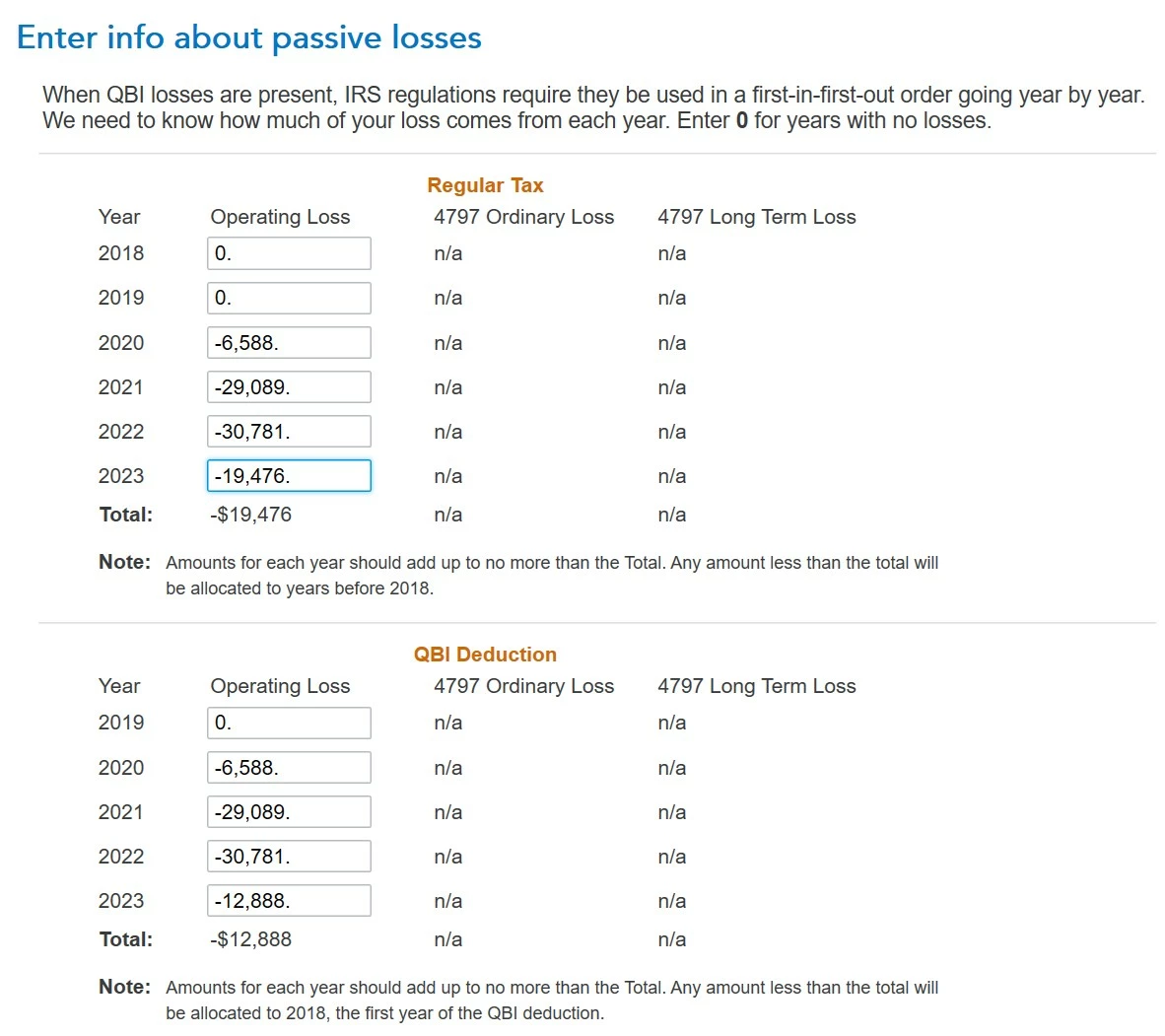
This TT Premier error seems to be the result of an erroneous calculation by TT.  See in the screenshot below how the Total value is equal to the 2023 value, and not with the sum of the values in the list.  As a result, the TT review generated the error message "QBI Passive Op Loss should not be greater than the total loss" and prevented the tax return to be finalized. The Total value cannot be overridden.  How can I fix these errors and finalize the return?


    1 reply

    PatriciaV
    Employee
    March 24, 2025

    It would be helpful to have a TurboTax ".tax2024" file to test this issue further.


    If you would be willing to send us a “diagnostic” file that has your “numbers” but not your personal information, please follow these instructions: 


    In TurboTax Desktop, open your return and go to Online in the TurboTax header. (On a Mac computer, choose Share or Help.)

    1. Choose Send Tax File to Agent.
    2. You will see a message explaining what the diagnostic copy is.  Click Send on this screen and wait for the Token number to appear.
    3. Reply to this thread with a screenshot of your Token number (this avoids Community filters for numbers with a dash) and tag (@) the Expert requesting the token from you.
    4. Please include any States that are part of your return - this is VERY important.

    We will then be able to see the same experience you are having. If we are able to determine the cause, we'll reply here and provide you with a resolution. 

    **Say "Thanks" by clicking the thumb icon in a post**Mark the post that answers your question by clicking on "Mark as Best Answer"
    DZHAuthor
    March 25, 2025

    Thank you, @PatriciaV. Please see the token number in the screenshot below. I'd appreciate any help on this issue.

    PatriciaV
    Employee
    March 25, 2025

    Thank you for the token. We have reviewed the form errors on Schedule E Worksheet Carryovers to 2024 Smart Worksheet, Continued. To resolve the errors, you will need to remove all entries other than 2020 for Regular Tax and QBI. These changes should bring the total of this sub-schedule in line with the totals on Line G of the Carryover worksheet, which will resolve the form error.


    To summarize, return to the passive losses entry screen as you posted earlier. Delete all entries other than the two for 2020.

    **Say "Thanks" by clicking the thumb icon in a post**Mark the post that answers your question by clicking on "Mark as Best Answer"




