
March 18, 2024
Solved

How do I delete an incorrect manually entered 1099B stmt entry?

  • March 18, 2024
  • 1 reply
  • 0 views

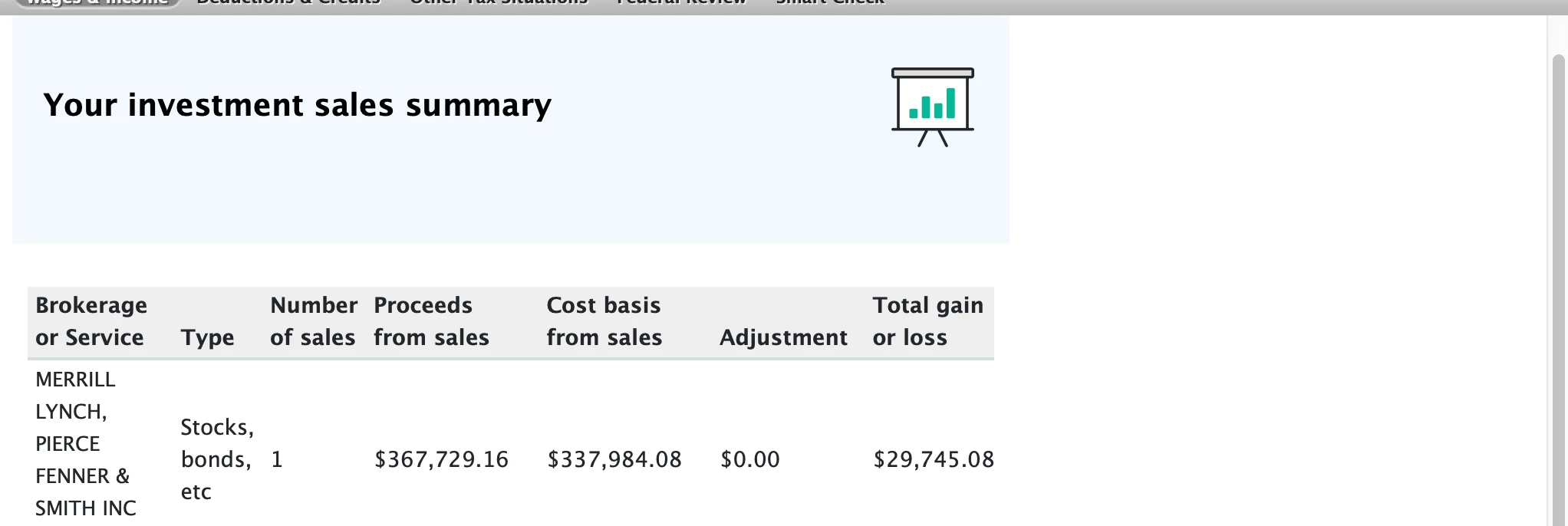
I manually entered totals from the 1099B, but need to enter individual lines to adjust the cost basis since it's a NQSO. I found a previous answer from last year to just click on the trash can icon to the right of the entries. I do not see that option and wonder if this year's software has been changed?? I can't figure another way and don't see an option even to edit what I've entered or imported for other statements.


I did not import it. I know I could remove the import, but that is not the situation here. 

Thank you for your help.
 

    Best answer by DianeW777

    No problem.  Try using the instructions below to delete your 1099-B entered in error.


    If you need to delete a from in TurboTax Desktop use the link below:

    You'll need to delete this form 1099-B. 

    • If you're using TurboTax CD\Download software and need to delete a form, click here

    Posted here for you as well:

    Mac instructions

    1. Open or continue your return.
    2. Switch to Forms Mode by selecting the Forms icon.
    3. From the menu, select the form you want to remove (if you don't see it, select Open Form at the top).
    4. From the Forms menu, select Remove [form name].
    5. Follow any onscreen instructions to remove the form or forms.

    Always use extreme caution when deleting information from your tax return.  There could be unintended consequences. 


    @hollysansing 

    1 reply

    rjs
    Employee
    March 18, 2024

    You have to scroll to the right to see the trash can. You might have to scroll down to the bottom to get a horizontal scroll bar.


    If you need more help with this, please say whether you are using TurboTax Online or the CD/Download Desktop TurboTax software. If you are using the CD/Download software, is it in Windows or a Mac?


    March 19, 2024

    Thank you for your suggestion. That's what the answer last year showed, which is why I took a picture. I have expanded my screen and scrolled left right and up and down. There is no trash can. It's the oddest thing. I've rebooted in case there was an update available, but there is not.


    I'm using a Mac, downloaded version from Amazon. I've done it this way for about 4 years and  never an issue like this before. I was surprised others hadn't reported since it doesn't seem it should be a single person issue. My computer is a 2020 so it's not super old. I'm not having any other problems w/ any other softwares.


    Appreciate any other suggestions. 

    Thanks so much!

    DianeW777Answer
    March 19, 2024

    No problem.  Try using the instructions below to delete your 1099-B entered in error.


    If you need to delete a from in TurboTax Desktop use the link below:

    You'll need to delete this form 1099-B. 

    • If you're using TurboTax CD\Download software and need to delete a form, click here

    Posted here for you as well:

    Mac instructions

    1. Open or continue your return.
    2. Switch to Forms Mode by selecting the Forms icon.
    3. From the menu, select the form you want to remove (if you don't see it, select Open Form at the top).
    4. From the Forms menu, select Remove [form name].
    5. Follow any onscreen instructions to remove the form or forms.

    Always use extreme caution when deleting information from your tax return.  There could be unintended consequences. 


    @hollysansing 

    **Say "Thanks" by clicking the thumb icon in a post**Mark the post that answers your question by clicking on "Mark as Best Answer"




