
February 20, 2024
Solved

Railroad Retirement RRB-1099-R Step-by-Step Questions

  • February 20, 2024
  • 2 replies
  • 0 views

This pertains to the questions I am getting when filling out the RRB-1099-R. After filling out the initial information page it asks the question: Did Bobby receive these funds as a beneficiary of a railroad employee who passed away?

Choice of answers are:

Bobby is a beneficiary of a railway employee who passed away.

Bobby is a spousal annuitant beneficiary.

Bobby was a railroad employee.

Why is the program presenting questions as if I am dead?


Onto the next question program asks;

What was the youngest age Bobby could have retired and received pension from Bobby's last employer if Bobby hadn't become disabled?

Now the program thinks I am disabled, I am not disabled.  How can I answer these questions truthfully?

Bob
    Best answer by LindaS5247

    We are exploring this issue further.


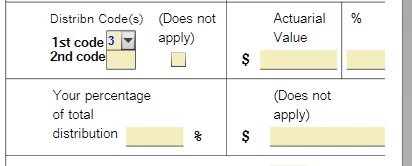
    However, in the meantime, you should be able to manually change that code to a 7. 


     I was able to change the 3  to a 7 using the following steps:


    1. Exit Forms Mode and go back to the step-by-step instructions.
    2. Delete your Form RRB-1099-R and re-enter it.
    3. Go back to forms mode and change the 3 to a 7 in the form you showed us.


    This should allow your pension to be calculated as a normal distribution.


    Click here for how to delete a form in TurboTax Desktop.


    Click here for how to delete a form in TurboTax Online.


    Please feel free to come back to TurboTax Community with additional information or questions or click here for help in contacting Turbo Tax Support. 


    2 replies

    JohnB5677
    February 21, 2024

    Please clarify your question.

    • I was not able to find this question on the RRB-1099 screen.  
    • What steps did you go through to get to those questions?


    Please contact us again with any questions, and provide some additional details.

    **Say "Thanks" by clicking the thumb icon in a post**Mark the post that answers your question by clicking on "Mark as Best Answer"
    bobhudAuthor
    February 21, 2024

    I'll have to get back to you in a couple of days, I am on my laptop right now and Turbo Tax is on my desktop. I have run to Kansas City tomorrow and I might be able to work on this on Fri 2/23.

    LindaS5247
    March 3, 2024

    I would like to take a deeper look at this, it would be helpful to have a TurboTax ".tax2023" file that is experiencing this issue. You can send us a “diagnostic” file that has your “numbers” but not your personal information. If you would like to do this, here are the instructions: Go to the black panel on the left side of your program and select Tax Tools.


    1. Then select Tools below Tax Tools.
    2. A window will pop up which says Tools Center.
    3. On this screen, select Share my file with Agent.
    4. You will see a message explaining what the diagnostic copy is. Click okay through this screen and then you will get a Token number.
    5. Reply to this thread with your Token number. This will allow us to open a copy of your return without seeing any personal information.

    Here are the instructions if you are using TurboTax CD/Download:


    1. Click on Online in the top left menu of TurboTax CD/Download for Windows
    2. Select 'Send Tax File to Agent'
    3. Write down or send an image of your token number then place in this issue.
    4. We can then review your exact scenario for a solution.
    5. Please also tell us any states included in the return.

    We will then be able to see exactly what you are seeing and we can determine what exactly is going on in your return and provide you with a resolution.


    Remember to leave your token number in a reply to this thread.


    **Say "Thanks" by clicking the thumb icon in a post**Mark the post that answers your question by clicking on "Mark as Best Answer"
    bobhudAuthor
    March 3, 2024

    Token: 1201354

    State: KS

    LindaS5247
    March 5, 2024

    We are exploring this issue further.


    However, in the meantime, you should be able to manually change that code to a 7. 


     I was able to change the 3  to a 7 using the following steps:


    1. Exit Forms Mode and go back to the step-by-step instructions.
    2. Delete your Form RRB-1099-R and re-enter it.
    3. Go back to forms mode and change the 3 to a 7 in the form you showed us.


    This should allow your pension to be calculated as a normal distribution.


    Click here for how to delete a form in TurboTax Desktop.


    Click here for how to delete a form in TurboTax Online.


    Please feel free to come back to TurboTax Community with additional information or questions or click here for help in contacting Turbo Tax Support. 


    **Say "Thanks" by clicking the thumb icon in a post**Mark the post that answers your question by clicking on "Mark as Best Answer"




