The fact that the income is reported on a Form 1099-MISC indicates it is not for self employment reasons. If you were involved in a self employment transaction then they would be required to report it that way using Form 1099-NEC. For this reason, you should not be concerned about entering your 1099-MISC as 'Other income' without paying self employment taxes on this income.
You can delete the Form 1099-MISC and then enter the income following the steps below.
- On the menu bar on the left that shows.
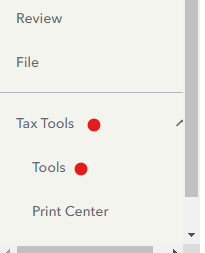
- Select Tax Tools
- On the drop-down select Tools
- On the Pop-Up menu select Delete a Form
- This will give you all of the forms in your return
- Scroll down to the form you want to delete
- Select the Form
- Click on Delete.
Always use extreme caution when deleting information from your tax return. There could be unintended consequences.
Other Miscellaneous Income:
Go to the Wages and Income section of TurboTax
- Scroll to Less Common Income > Select Miscellaneous Income, 1099-A, 1099-C
- Select Other reportable Income > Enter a description (----) and the amount
@osanbat9











