
April 1, 2025
Question

Married filing jointly with resident and nonresident status across NY and NJ

  • April 1, 2025
  • 1 reply
  • 0 views

My wife and I are filing jointly for the first time. She lives and works in New York while I live and work in New Jersey. As per previous advise that was provided to us, we are attempting to file the federal, New York, and New Jersey returns as follows:


  • Federal: Married Filing Jointly including both incomes
  • New Jersey: Married Filing Separately including only my income
  • New York: Married Filing Jointly including only my wife's income

We are using TurboTax Online and have the following questions:

  1. After filling out the federal return TurboTax automatically pulls in both wages into both New York and New Jersey state returns. Is there a way to prevent this?
  2. For some reason TurboTax is give an error in the New York return when I try to list my wife as a resident and myself as a nonresident : . Is there something that I'm doing wrong?
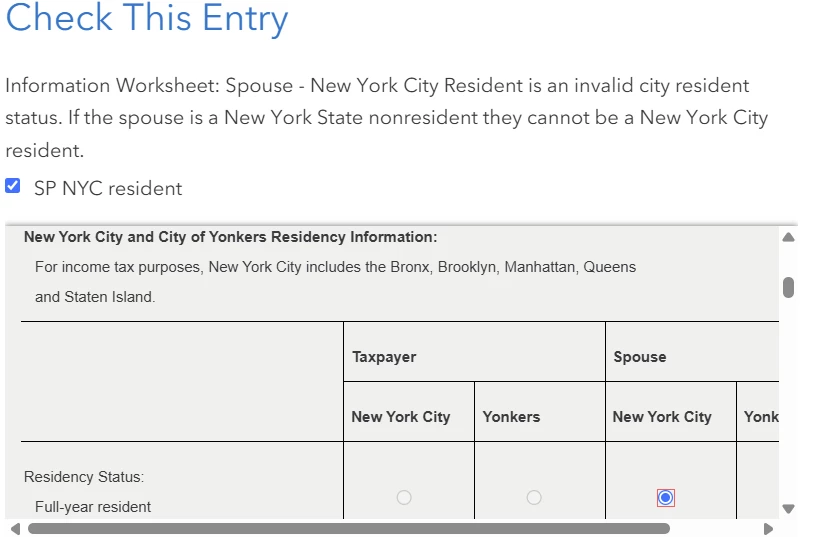
  3. Can all of this be properly done using TurboTax Online?

Any help would be much appreciated.

1 reply

April 2, 2025

I would like to take a deeper look at this. However, I need a diagnostic file which is a copy of your tax return that has all of your personal information removed. You can send one to us by following the directions below:


TurboTax Online:

  1. Sign into your online account.
  2. Locate the Tax Tools on the left-hand side of the screen.
  3. A drop-down will appear. Select Tools
  4. On the pop-up screen, click on “Share my file with agent.”
  5. This will generate a message that a diagnostic file gets sanitized and transmitted to us.
  6. Please provide the Token Number that was generated in the response.

TurboTax Desktop/Download Versions:

  1. Open your return.
  2. Click the Online tab in the black bar across the top of TurboTax and select “Send Tax File to Agent” *
  3. This will generate a message that a diagnostic copy will be created.  Click on OK and the tax file will be sanitized and transmitted to us.
  4. Please provide the Token Number (including the dash) that was generated in the response.

*(If using a MAC, go to the menu at the top of the screen, select Help, then, “Send Tax File to Agent”)


**Say "Thanks" by clicking the thumb icon in a post**Mark the post that answers your question by clicking on "Mark as Best Answer"
Super_DAuthor
April 2, 2025

Hi @BrittanyS ,


Here's the token number 1298579

April 2, 2025

I was able to clear the error by changing the selection from non-resident to full-year resident.  Then I selected spouse and spouse resident for New York City.  See the screenshots below:


@Super_D 

**Say "Thanks" by clicking the thumb icon in a post**Mark the post that answers your question by clicking on "Mark as Best Answer"




