
February 2, 2024
Question

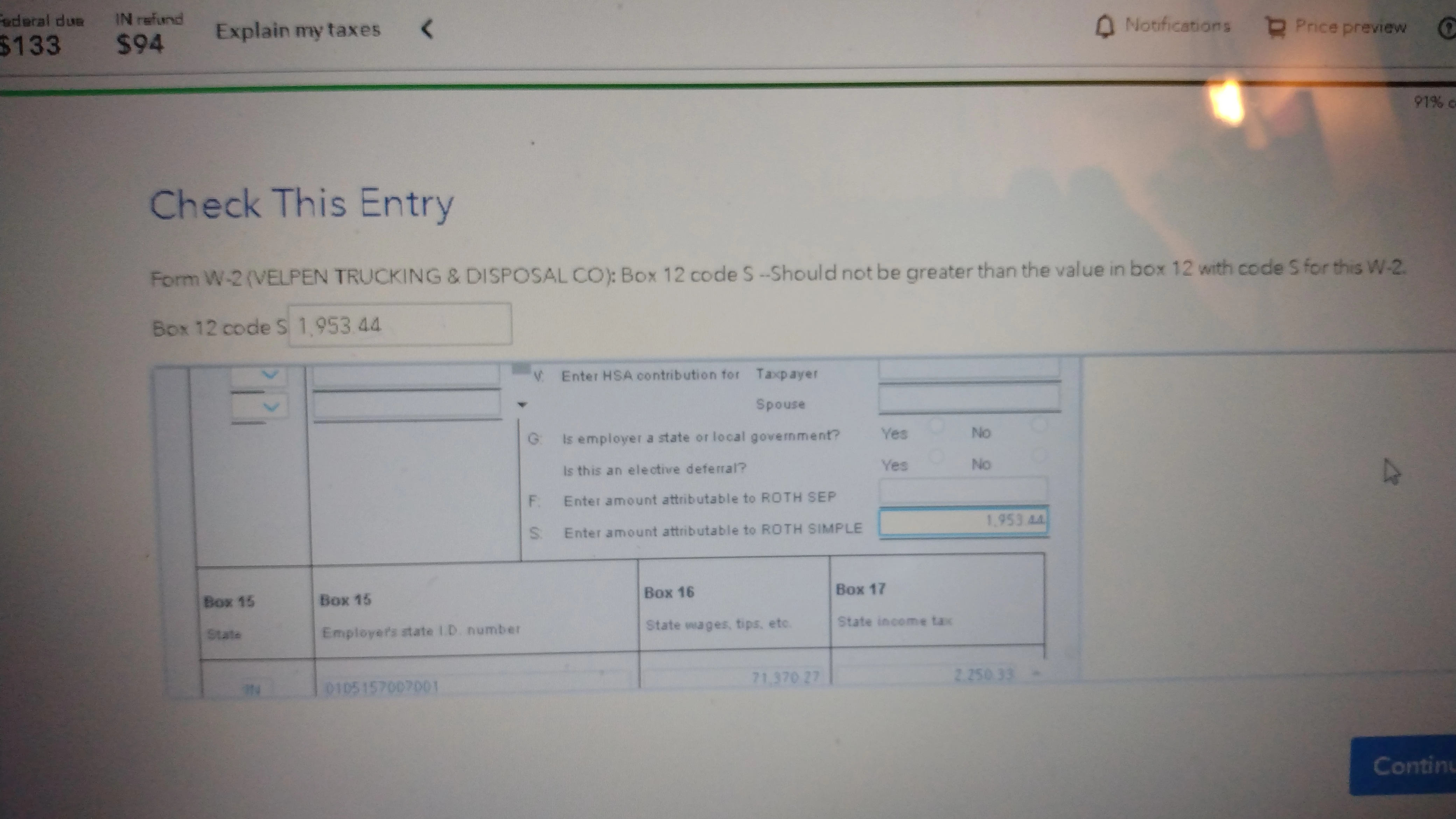
Problem With Box 12 Code S

  • February 2, 2024
  • 5 replies
  • 0 views

I'm nearly done filing my return, but TT keeps insisting that something is wrong with my W2 entries, specifically Box 12 Code S. I keep getting the message "box 12 code s should not be greater than the value in box 12 with code s for this W2". I have checked and rechecked in the amount I have entered is exactly as it is on the W-2. Please tell me what I'm doing wrong. Thank you.
 

5 replies

February 2, 2024

I don't understand the error message, which is something like "a black cat is a cat that's black".


No matter, when I run my test return with similar data, I got in the Review the following:


"Form W-2 (employer name): Box 12 code - We are updating how Traditional SEP and Roth SEP are reported on the tax return based on new guidance from the IRS. Please check back with us after February 7th."


Now, this was triggered by a Notice from the IRS issued on January 8th of this year which updated(changed) a lot of rules on how things like SIMPLE plans were to be reported. As you can imagine, Development teams have been busy making updates and testing them.


I have seen other messages related to this issue, but this is the first time I have seen this particular message. Let me say that I believe that today that there was and update on this issue, and it may have affected something else. I will report this, but quite possibly, it will be fixed by the 7th.

**Say "Thanks" by clicking the thumb icon in a post**Mark the post that answers your question by clicking on "Mark as Best Answer"
February 7, 2024

I have read here and online that the problem with Box 12 and specifically for SIMPLE IRA will be fixed by Feb. 7.  I just checked yet again and still nothing.  Your inability to inform your customers of the status of your programming is inexcusable.  My taxes have been ready to file for more thank a week and I have to wait on you?  I may just spring for another program and ditch TT

February 8, 2024

I am so fed up with this error.  It was supposed to be resolved yesterday but still nothing.  Is there any update on when the program will be updated?

February 2, 2024

yes, there is a problem caused by code S. The IRS updated the rules for a Simple plan early in 2024. Turbotax and other return preparers are analyzing the new law to see how it affects returns. There is nothing you can do until they complete this and update the app if needed. 

February 4, 2024

Please provide specific instructions on what to do. For example:


If you get an error because of Box 12 on your W2 using an S code. because the IRS recently issued changes and we(TT) are updating the program, you cannot file your return today. Please save and close the return and then check back and try to efile your return on February 7. If we are still not able to file your return on that date a new date and instructions will be provided. TT appreciates your understanding our commitment to file your return correctly with the latest changes from the IRS only have we have fully researched those changes and updated our programs. 


Please advise, 

Verna Murdock


February 8, 2024

This is not a recommendation, but users on Reddit have been getting through by removing numbers to the right of the decimal. This concerns me because, if true, the problem is more likely a technical problem and not an IRS one.

February 8, 2024

Right. That was the first thing I tried, rounding down. However if you do that, the calculation of Box1 would not be correct and SHOULD get flagged… I don’t want to submit it to the IRS and risk rejection or audit. 

IsabellaG
Employee
February 12, 2024

We are currently  looking into this situation, but the steps that I described will allow you to file your return, and it will be an accurate tax return. @aaronmg412

**Say "Thanks" by clicking the thumb icon in a post**Mark the post that answers your question by clicking on "Mark as Best Answer"
February 10, 2024

Token# 1178422

IsabellaG
Employee
February 11, 2024

I worked with your diagnostic file, and when I removed the cents on the screen Tell us more about your retirement contributions I found that I no longer received that error message. 

Also, if I removed the cents in the box on the screen  Check this Entry, I was also able to remove the error message. I get the same result if I remove the cents on the line  Box 12 S: on the   Check this Entry screen. See the screenshot below. 

I know that you expressed concern that removing the cents would cause your return to be "flagged" but please note that the amount from Box 1 of your W-2 is reported as a round number, and the removal of the cents amount on the screens that I am referencing would not affect the accuracy of your tax return.


We are looking into this situation, but the above steps should enable you to file an accurate tax return.


[Edited 02/12/2024|6:16 am PST]


@namkooh30 

**Say "Thanks" by clicking the thumb icon in a post**Mark the post that answers your question by clicking on "Mark as Best Answer"
February 12, 2024

@IsabellaG so turbo tax is forcing us to change the number from our W-2?




