March 15, 2020
Solved

SC State taxes - where is deduction for "Interest from US obligations" requested in TurboTax program??

  • March 15, 2020
  • 1 reply
  • 0 views

The SC state tax form allows deductions for interest from US Obligations.  This is identified in Line m that states:

"Line m: Interest from US obligations
Enter the interest income from US obligations that you reported as income on your federal Income Tax return. US obligations include savings bonds, treasury notes, and treasury bills. For more information see South Carolina Revenue Ruling #16-2 at dor.sc.gov/policy.
Interest income from the following obligations are taxable for state purposes:
• Federal Home Loan Mortgage Corporation (Freddie Mac)
• Federal National Mortgage Association (Fannie Mae)
• Government National Mortgage Association (Ginnie Mae)"


I don't see where TurboTax ever prompts you to input this information.  Every year I have to manually add it to the tax form.  Where does Turbo Tax ask for this information??


Thanks!
    Best answer by SteamTrain

    TTX does Handle it...but many people don't realize it's handled on a follow-up page when you enter your 1099-DIV form in the Federal section.  


    (examples are from a prior year desktop software..but this year's "Online" software looks and handles very  similarly)

    ________________________

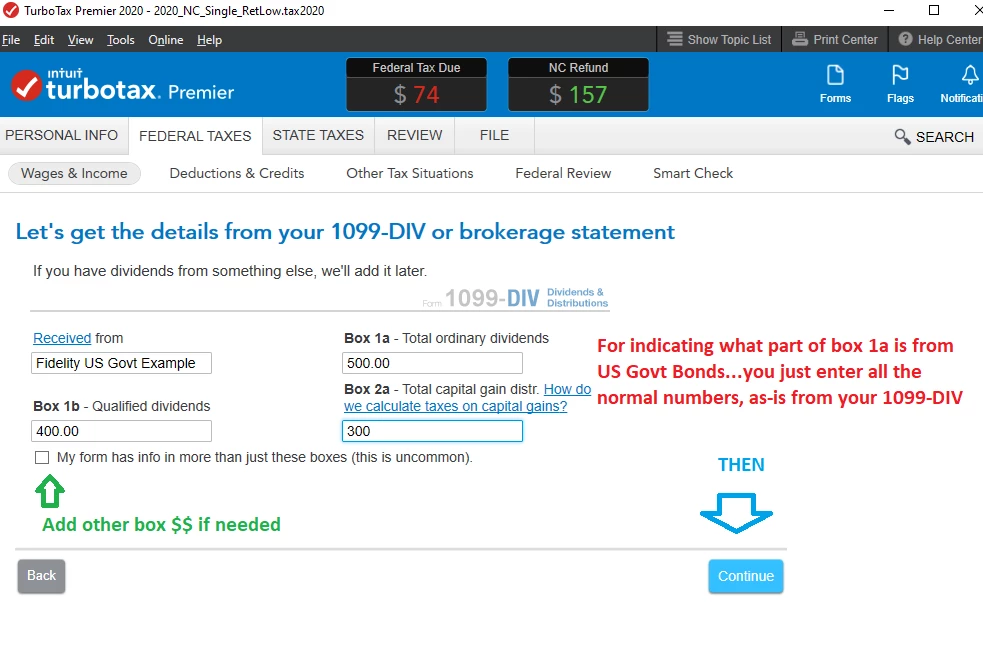
    1) you enter your 1099-DIV as usual  (picture 1 below)

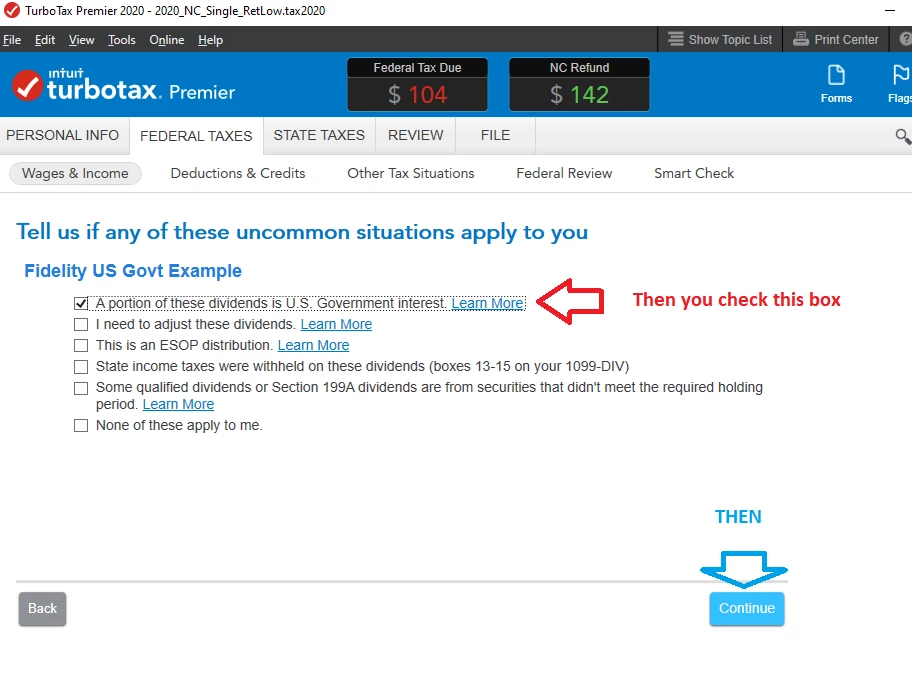
    2) On a page after the main 1099-DIV, you check the box indicated. (Picture #2)

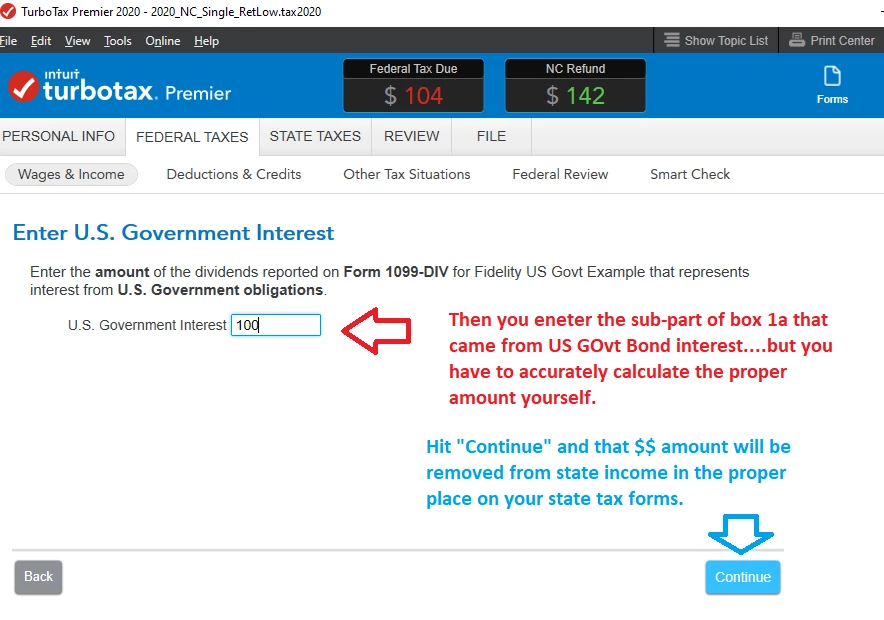
    3)  Then on a later page, you will be able to enter the sub-amount of box 1a$$ that were US Obligation $$. (Picture #3)


    Then, those $$ should carry to into the proper area on any state's forms.

    ___________________________________

    _______________________________

    ________________________________

    _______________________________

    ______________________________


    @rnewsome 


    1 reply

    ReginaM
    March 17, 2020

    The data that you enter into TurboTax is for your Federal Return automatically populates your State of South Carolina Return.  There is no need to make separate entries for your Interest Income as it is entered by following these steps in TurboTax:

    1. While in your Tax Home,
    2. Select Search,
    3. Enter 1099-INT,
    4. Select Jump to 1099-INT,
    5. Select Add a 1099-Int,
    6. Make sure that Box 3 has been completed.This will then transfer over to 3 m of you South Carolina Return.
    **Say "Thanks" by clicking the thumb icon in a post**Mark the post that answers your question by clicking on "Mark as Best Answer"
    leeshoAuthor
    March 20, 2020

    I don't think that you fully understand my question.  All of my interest income is from Edward Jones.  I used the feature in TurboTax to upload all information from my Edward Jones account.  I double checked and this was uploaded correctly.  The issue is that when I uploaded the state of SC Taxes on TurboTax, this program never asks me for the "Subtractions From Federal Taxable Income" Section, Line m "Interest income from obligations of the U.S. government".  This allowable subtraction is clearly shown on my Edwards Jones tax documents.   I have to switch over to the Forms section in TurboTax and manually input this allowed deduction.  This is an extremely popular deduction for SC taxes, but many people like miss it because the TurboTax program never asks for the information????  You will need to look at a SC Tax form to better understand my question.  Thanks!

    AmyC
    Employee
    March 20, 2020

    Yes, the SC form 502SU has a special box for Income from US Obligations worksheet under line aa. It is then carried to line ab. I used both interest and dividends to make sure the program is working correctly.You should not have to do anything.


    This information then carries to the 502, line 13 with the proper codes. In this case, code AB is carried.

    This follows the instructions MD offers here for MD tax forms., please see page 7 for full details.


    **Say "Thanks" by clicking the thumb icon in a post**Mark the post that answers your question by clicking on "Mark as Best Answer"