February 12, 2025
Solved

State Return (PA) stuck on e-file option, but I want to manually file via mail

  • February 12, 2025
  • 2 replies
  • 0 views

I'm using TurboTax 2024 Deluxe on Windows (Version 024.000.0293). My purchase included a state, which I was able to register successfully (PA) and have prepared my Federal & State returns.  My Federal return has been e-filed successfully, but I do not wish to e-file my State return - I wish to submit it manually by printing out the forums and mailing them in.


However, Turbotax seems to be 'stuck' on thinking I wish to e-file my state return.  If I go to the 'File' section, I can see that my federal return has already been e-filed, but my only other option for my state return is "Do not e-file my state return now, I'll do it later" (I have no desire to E-file later).  If I select this option, the dialog sequence just ends saying "Nothing was selected to E-File".  If I go to save the PDF documents prepared for my state return, it includes the form for "DECLARATION FOR ELECTRONIC FILING", & marks the 'E-File Opt Out' as "N" (should be "Y" for opting-out of E-file).

I've already gone back to review my "State Taxes" section under the "bottom line summary" and have re-indicated that I don't wish to apply my refund to my 2025 return, and I don't wish to make any donations with it - but this does not seem to change the forms generated for me to mail.  I can't seem to find any avenue to have it revise the documents for manual filing.  Any suggestions?
    Best answer by mglauner

    Thanks Brittany -- the issue is that the prompt you describe in Step 2 does not exist for me.  Here's the workflow as I experience it:

    Click the "File" tab:

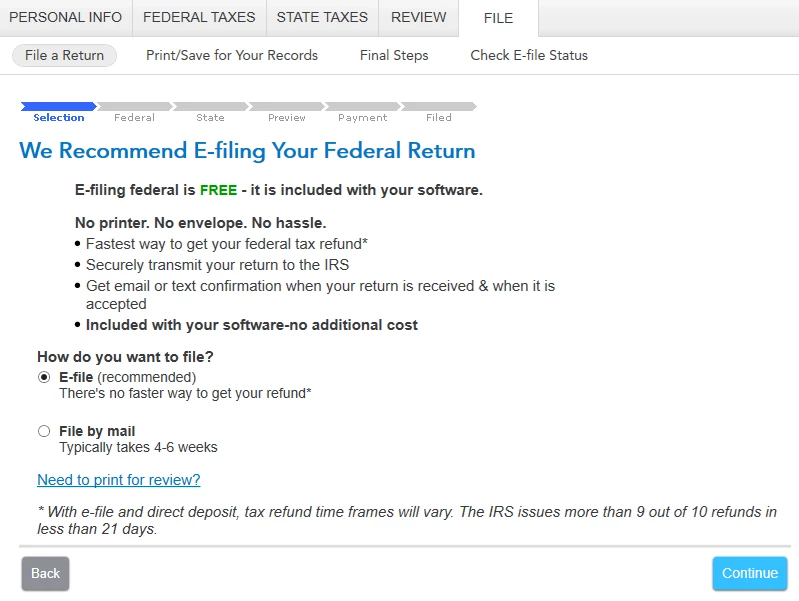
    Click 'Continue':

    My Federal return has already been E-file'd successfully - so I leave the 'E-file' option selected and click 'Continue':

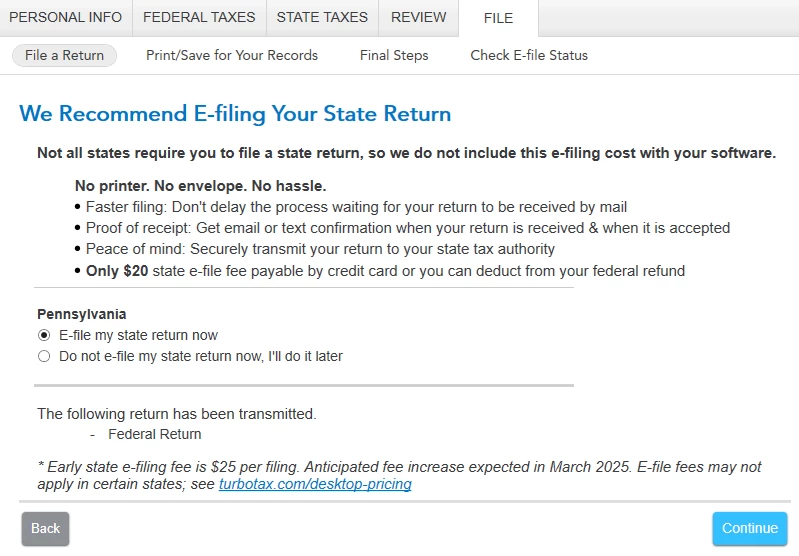
    There is no option for 'File by mail' on the screen concerning my State return. 


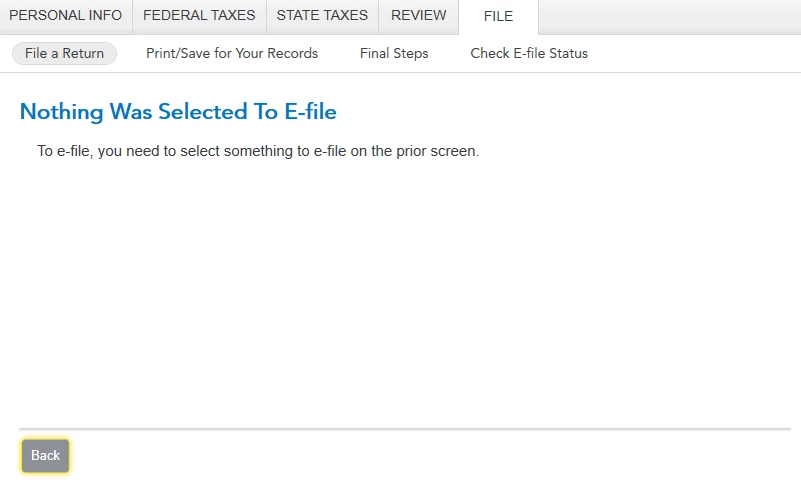
    If I select the option for 'Do not e-file my state return now,  I'll do it later' - the next screen is just a dead-end saying "Nothing Was Selected To E-file":

    If I jump to the 'Print/Save for Your Records' section - the documents exist, but everything is prepared as if I was E-Filing my State return.


    Since you already Efiled your Federal return, and it is Accepted, yes, you can mail your State return.


    On the screen, 'We recommend Efiling your Federal Return', choose 'File by Mail'. then on the following screen 'We recommend Efililng your state return' you should now see the option to File By Mail.


    Here's more info on Filing Federal and State Returns Separately.


    @coachhoach 


    2 replies

    February 17, 2025

    Try these steps to change your filing for the state:


    1. Log in to TurboTax
    2. Click State Taxes
    3. Click Add a State (you're not actually going to add a state, this will just open up the return to make changes)
    4. Click edit next to your state
    5. Click review
    6. continue from the return  and choose the filing option you would like


    **Say "Thanks" by clicking the thumb icon in a post**Mark the post that answers your question by clicking on "Mark as Best Answer"
    February 18, 2025

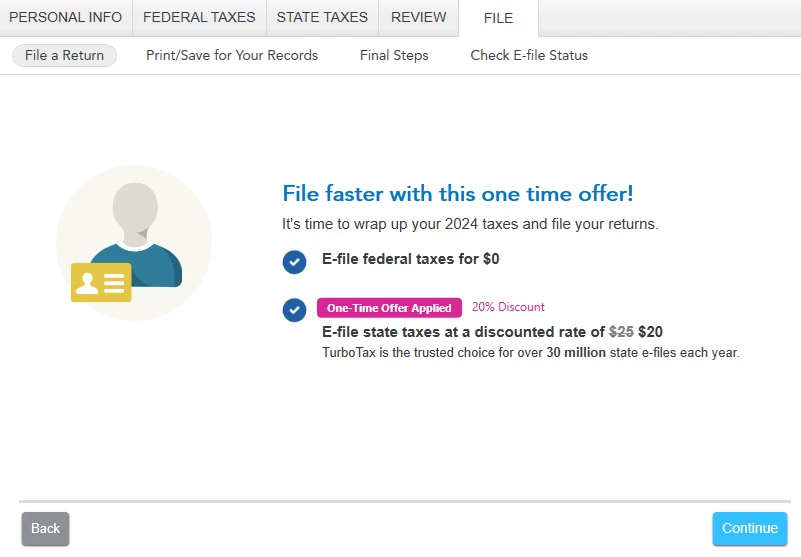
    Thanks for your reply -- unfortunately this does not help to resolve the issue.  I noticed that the program has now updated to offer me a 20% discount on e-filing my state return, which is frustrating since I don't seem to have the option to just file manually via mail.


    PA is already listed as my state, and I'm able to click the 'edit' button and review parts/all of the state return walkthrough.  I am owed a refund on my state return.  I just now again stepped through every section within the state again, and went through the 'review' section completely, but the end result under the "File"-> "File a return" section is "Do not e-file my state return now, I'll do it later".  There seems to be no option offered to prepare / save / print the documents for filing via mail.


    February 18, 2025

    Can you clarify if when you click Print/Save for Your Records beside "File a Return," it does not have anything listed?


    @coachhoach 

    **Say "Thanks" by clicking the thumb icon in a post**Mark the post that answers your question by clicking on "Mark as Best Answer"
    February 27, 2025

    what is the answer. i cannot see the replies


    February 28, 2025

    Effectively, you have to choose the 'File by Mail' option on the first page of the 'File a return' workflow.  Even though this screen specifically mentions your Federal return only - the choice you make on this page influences how it prepares both your Federal & State returns.


    So if you're like me and want to e-file your Federal return, but mail file your State return -- you need to progress through the 'E-file' option for your Federal return, while choosing to not e-file your State return now, and proceed all the way through to the end where your Federal return (only) is completely e-file'd.


    Then, go back to the beginning of this section again, this time selecting 'File by mail' on the screen asking about your Federal return.  On the next page, it will give you the option to file your State return by mail (as well as prompting to file your Federal return via mail).  If you continue to the next step, it wants to walk through filing your Federal return by mail first (even though it was already e-filed) - so you can just jump straight to the section of printing/saving documents, and grab the relevant ones for your State return. 

    March 27, 2025

    THANK YOU SO MUCH.  I have been asking similar questions (though a different state, Massachusetts).  Everyone seems to be saying "Oh, just click on the option on the screen...." as if I was so dumb I could not see that.  The idea that you'd need to backtrack to the federal return, which I had already e-filed, just to regenerate the state return in mail-able form, would never have occurred to me. ESPECIALLY since I have been filing in this same manner with T-tax for decades and I have never had to do this before.